Add and remove apps from inside a Collection, right on the Collection’s page.
New
A Collection’s contents aren’t fixed. You can change which apps are in a Collection at any time, directly from the Collection’s page — no separate “manage” screen. Every Collection you created is on the My collections tab under Discover → Collections.
Walkthrough: adding and removing apps in a Collection.
You need edit access to the Collection — Editor or Owner — to add or remove apps. Recipients with User access can use the apps but can’t change the contents.
Click Collections under Discover in the sidebar, then click the Collection. Collections you created are on the My collections tab.
Click Add apps
The Add apps button is in the top right of the Collection’s page. It opens the Add apps to [Collection name] dialog.
Find the apps you want
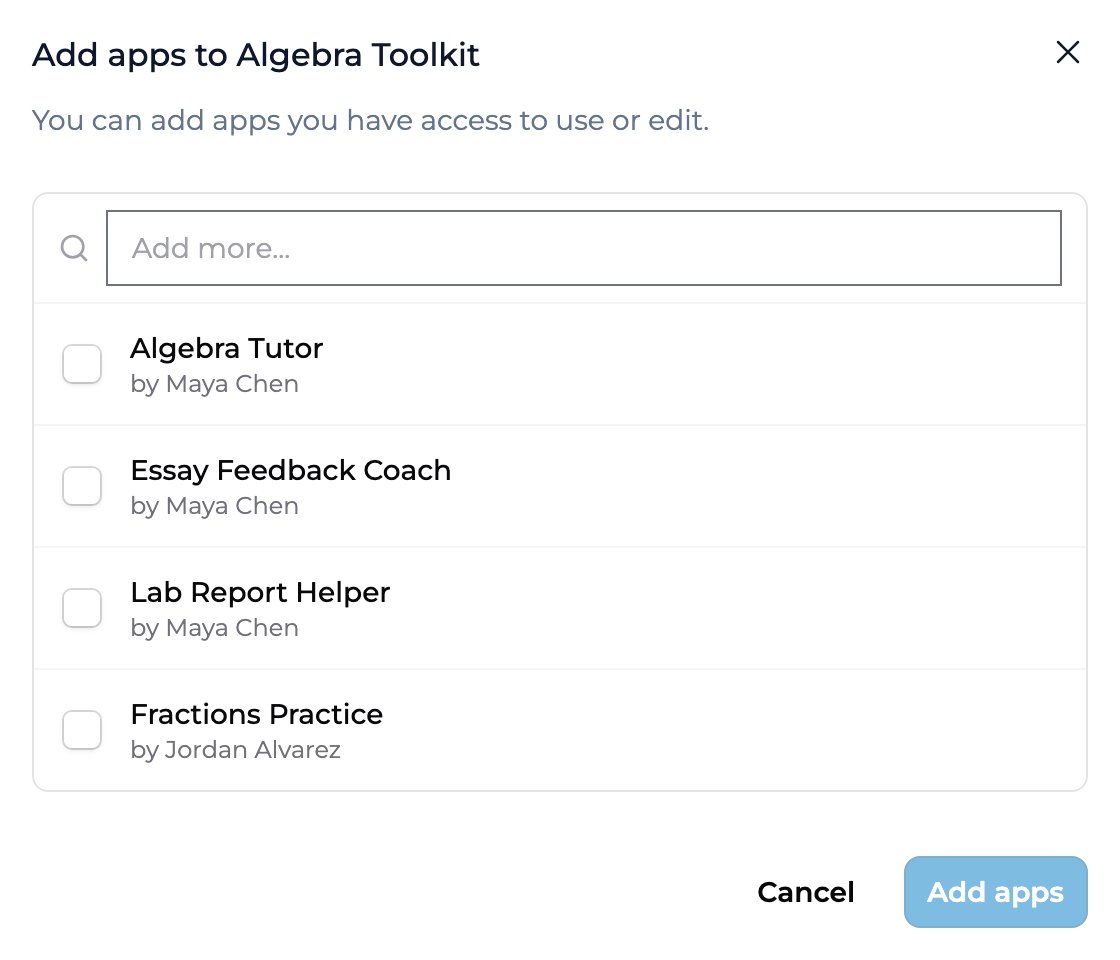
The dialog lists apps you have access to, each labeled with its creator (by …). Use the Add more… search field to filter by name. You can add any app you have access to use or edit — your own apps, apps shared with you, or apps from another Collection you can see. Apps already in the Collection don’t appear here.
Select and confirm
Check the box next to each app you want to include, then click Add apps. The button stays inactive until you’ve selected at least one app, and reflects your selection count (for example, Add 3 apps).
The Add apps dialog: search for apps you can access, check the ones to include, then click Add apps.
Click the ⋮ menu on the app’s card and choose Remove from collection.
Confirm
Click Remove in the confirmation dialog. The app leaves the Collection right away.
Removing an app from a Collection does not delete it. The app stays in its original space, keeps its owner, and remains in any other Collections it belongs to. You’re only changing this Collection’s contents.
To rename a Collection, click the pencil icon next to its name at the top of the Collection’s page, or choose Rename from the Collection card’s ⋮ menu on the Collections list. Editors and Owners can rename.Delete isn’t on the Collection’s page. Go back to Discover → Collections, open the Collection card’s ⋮ menu, and choose Delete. Only Owners can delete a Collection. The apps in it aren’t affected, but people you shared the Collection with lose access to the apps through it.
Recipients don’t need to re-add the Collection after you change it. Apps you add appear automatically; apps you remove drop out of recipient views. Everyone sees the updated set on their next visit. The same is true when an app’s owner publishes a new version — the update flows through the Collection. See Using a shared Collection for the recipient side.
No. Remove from collection only takes the app out of this Collection. The app stays in its space, keeps its owner, and stays in any other Collections it’s part of.
Which apps can I add?
Any app you have access to use or edit — your own apps, apps shared with you, and apps from another Collection you can see. Apps already in the Collection are hidden from the picker.
Where do I find my Collections?
All your collections are under Discover → Collections → My collections.
Can recipients add or remove apps?
Only if you’ve given them Editor (or Owner) access. The default User access lets recipients use the apps but not change the Collection.
What happens to recipients when I remove an app?
It drops out of the Collection for everyone. Recipients who could reach the app only through this Collection lose access to it. Their past sessions aren’t deleted.
{"docsConfig":{"theme":"mint","$schema":"https://mintlify.com/schema.json","name":"Playlab Learning Hub","colors":{"primary":"#3B82F6","light":"#60A5FA","dark":"#2563EB"},"logo":{"light":"https://mintcdn.com/playlabai/utDTSOWmKvEQ98EU/images/Playlab_Logo_Full_Black.svg?fit=max\u0026auto=format\u0026n=utDTSOWmKvEQ98EU\u0026q=85\u0026s=d97827114d3fcc02ee8b1933cd33990d","dark":"https://mintcdn.com/playlabai/utDTSOWmKvEQ98EU/images/Playlab_Logo_Full_Paper.svg?fit=max\u0026auto=format\u0026n=utDTSOWmKvEQ98EU\u0026q=85\u0026s=3fe8091c5012462c6a9679c1fcbd8953","href":"https://www.playlab.ai"},"favicon":{"light":"https://mintcdn.com/playlabai/utDTSOWmKvEQ98EU/images/Playlab_Logo_Black_Background_Small_Padding.png?fit=max\u0026auto=format\u0026n=utDTSOWmKvEQ98EU\u0026q=85\u0026s=7facc29acffbc6bdfa6953473a61026e","dark":"https://mintcdn.com/playlabai/utDTSOWmKvEQ98EU/images/Playlab_Logo_Paper_Black_Background.png?fit=max\u0026auto=format\u0026n=utDTSOWmKvEQ98EU\u0026q=85\u0026s=41576e87d0c66007c23406b6b1a84d1e"},"seo":{"metatags":{"og:image":"/images/og-card.png","twitter:image":"/images/og-card.png","twitter:card":"summary_large_image"}},"icons":{"library":"tabler"},"styling":{"latex":true},"navigation":{"pages":[]}},"deployment":{"deploymentMetadataValue":{"subdomain":"playlabai","hasAudioNarration":false,"actualSubdomain":"playlabai","customDomains":["learn.playlab.ai"],"gitSource":{"type":"github","owner":"playlab-education","repo":"docs","deployBranch":"main","contentDirectory":"","isPrivate":true,"mountPath":"","label":""},"entitlements":{"AI_CHAT":{"status":"ENABLED"},"WEB_MCP":{"status":"ENABLED"},"NARRATION":{"status":"ENABLED"}},"buildId":"6af3518d99e0270dac4b465b","clientVersion":"0.0.4102","searchFilterCounts":[{"language":"default","tag":"📋 Feature Documentation","count":54},{"language":"default","tag":"📚 Resources","count":23},{"language":"default","tag":"✏️ Learn on Your Own","count":19},{"language":"default","tag":"❓ FAQ","count":16},{"language":"default","tag":"⚙️ Changelog","count":8},{"language":"default","tag":"🔒 Privacy, Safety \u0026 Compliance","count":8},{"language":"default","tag":"🛠️ Build \u0026 Collaborate","count":8},{"language":"default","tag":"🟡 Basic Prompting","count":8},{"language":"default","tag":"🟣 Building Your App","count":7},{"language":"default","tag":"🟢 Voice, Language \u0026 Accessibility","count":7}]},"assistantConfig":{"deflection":{"enabled":true,"email":"support@playlab.ai"}},"basePath":"","hasChatPermissions":true,"hasWebMcpPermissions":true,"toggles":[{"name":"kill-isr","enabled":true,"variant":{"name":"disabled","enabled":false,"feature_enabled":true},"impressionData":false},{"name":"custom-rbac-roles","enabled":true,"variant":{"name":"disabled","enabled":false,"feature_enabled":true},"impressionData":false},{"name":"agent-mintlify-slack","enabled":true,"variant":{"name":"disabled","enabled":false,"feature_enabled":true},"impressionData":false},{"name":"agent-integrations-settings","enabled":true,"variant":{"name":"disabled","enabled":false,"feature_enabled":true},"impressionData":false},{"name":"rbac-expansion","enabled":true,"variant":{"name":"disabled","enabled":false,"feature_enabled":true},"impressionData":false},{"name":"automations-pr-grouping","enabled":true,"variant":{"name":"disabled","enabled":false,"feature_enabled":true},"impressionData":false},{"name":"custom-prefix","enabled":true,"variant":{"name":"disabled","enabled":false,"feature_enabled":true},"impressionData":false},{"name":"analytics-v7","enabled":true,"variant":{"name":"disabled","enabled":false,"feature_enabled":true},"impressionData":false},{"name":"user-flows-analytics","enabled":true,"variant":{"name":"disabled","enabled":false,"feature_enabled":true},"impressionData":false},{"name":"no-publish-flow","enabled":true,"variant":{"name":"disabled","enabled":false,"feature_enabled":true},"impressionData":false},{"name":"workos-onboarding","enabled":true,"variant":{"name":"disabled","enabled":false,"feature_enabled":true},"impressionData":false},{"name":"llms-txt-v2","enabled":true,"variant":{"name":"disabled","enabled":false,"feature_enabled":true},"impressionData":false},{"name":"snapshot-serving-live","enabled":true,"variant":{"name":"disabled","enabled":false,"feature_enabled":true},"impressionData":false},{"name":"stripTemperatureMiddleware","enabled":true,"variant":{"name":"disabled","enabled":false,"feature_enabled":true},"impressionData":false},{"name":"support-platform-pylon-zendesk","enabled":true,"variant":{"name":"disabled","enabled":false,"feature_enabled":true},"impressionData":false},{"name":"snapshot-serving","enabled":true,"variant":{"name":"disabled","enabled":false,"feature_enabled":true},"impressionData":false},{"name":"instant-rollback","enabled":true,"variant":{"name":"disabled","enabled":false,"feature_enabled":true},"impressionData":false},{"name":"granular-notifications-server","enabled":true,"variant":{"name":"disabled","enabled":false,"feature_enabled":true},"impressionData":false},{"name":"granular-notifications","enabled":true,"variant":{"name":"disabled","enabled":false,"feature_enabled":true},"impressionData":false},{"name":"automations-fable","enabled":true,"variant":{"name":"disabled","enabled":false,"feature_enabled":true},"impressionData":false},{"name":"fixed-ai-action-pricing","enabled":true,"variant":{"name":"disabled","enabled":false,"feature_enabled":true},"impressionData":false},{"name":"automation-resolve-merge-conflict","enabled":true,"variant":{"name":"disabled","enabled":false,"feature_enabled":true},"impressionData":false},{"name":"scoped-publishing","enabled":true,"variant":{"name":"disabled","enabled":false,"feature_enabled":true},"impressionData":false},{"name":"mintql","enabled":true,"variant":{"name":"disabled","enabled":false,"feature_enabled":true},"impressionData":false},{"name":"page-level-analytics","enabled":true,"variant":{"name":"disabled","enabled":false,"feature_enabled":true},"impressionData":false},{"name":"editor-version-history-v2","enabled":true,"variant":{"name":"disabled","enabled":false,"feature_enabled":true},"impressionData":false},{"name":"billing-page-v2","enabled":true,"variant":{"name":"disabled","enabled":false,"feature_enabled":true},"impressionData":false},{"name":"full-page-search","enabled":true,"variant":{"name":"disabled","enabled":false,"feature_enabled":true},"impressionData":false},{"name":"workspace-projects","enabled":true,"variant":{"name":"disabled","enabled":false,"feature_enabled":true},"impressionData":false},{"name":"assistant-v5","enabled":true,"variant":{"name":"disabled","enabled":false,"feature_enabled":true},"impressionData":false},{"name":"fork-pr-previews","enabled":true,"variant":{"name":"disabled","enabled":false,"feature_enabled":true},"impressionData":false},{"name":"revalidation-jwt","enabled":true,"variant":{"name":"disabled","enabled":false,"feature_enabled":true},"impressionData":false},{"name":"workos-sso-scim","enabled":true,"variant":{"name":"disabled","enabled":false,"feature_enabled":true},"impressionData":false},{"name":"hobby-abuse-scan","enabled":true,"variant":{"name":"disabled","enabled":false,"feature_enabled":true},"impressionData":false},{"name":"dashboard-inbox","enabled":true,"variant":{"name":"disabled","enabled":false,"feature_enabled":true},"impressionData":false},{"name":"workos-signup","enabled":true,"variant":{"name":"disabled","enabled":false,"feature_enabled":true},"impressionData":false},{"name":"turbopuffer-dual-write","enabled":true,"variant":{"name":"disabled","enabled":false,"feature_enabled":true},"impressionData":false},{"name":"workos-enabled","enabled":true,"variant":{"name":"disabled","enabled":false,"feature_enabled":true},"impressionData":false},{"name":"approve-review-flow","enabled":true,"variant":{"name":"disabled","enabled":false,"feature_enabled":true},"impressionData":false},{"name":"editor-metadata","enabled":true,"variant":{"name":"disabled","enabled":false,"feature_enabled":true},"impressionData":false},{"name":"sso-setup-deadline-banner","enabled":true,"variant":{"name":"disabled","enabled":false,"feature_enabled":true},"impressionData":false},{"name":"turbopuffer-serve","enabled":true,"variant":{"name":"disabled","enabled":false,"feature_enabled":true},"impressionData":false},{"name":"live-agents","enabled":true,"variant":{"name":"disabled","enabled":false,"feature_enabled":true},"impressionData":false}],"googleFontsInlined":false},"customCss":[{"filePath":"styles/v2-badges.css","content":".pl-badges{display:flex;flex-wrap:wrap;gap:6px;margin:0 0 1.25rem}.pl-badge{display:inline-flex;align-items:center;gap:4px;padding:3px 10px;border-radius:999px;font-family:\"Spline Sans Mono\", ui-monospace, \"SF Mono\", Menlo, monospace;font-size:11px;font-weight:500;line-height:1.5;letter-spacing:0.05em;text-transform:uppercase;white-space:nowrap}.pl-badge--neutral{background-color:#ffffff;color:#4F46E5;border:1px solid #4F46E5}.pl-badge--new{background-color:#4F46E5;color:#ffffff;border:1px solid #4F46E5}"},{"filePath":"styles/audience-tabs.css","content":".pl-audience-tabs [data-component-part=\"tabs-list\"]{display:grid;grid-template-columns:repeat(2, minmax(0, 1fr));gap:12px;border-bottom:0;padding-bottom:0;margin-bottom:2rem}.pl-audience-tabs [data-component-part=\"tab-button\"]{justify-content:center;gap:10px;max-width:none;width:100%;margin-bottom:0;padding:18px 20px;border:2px solid rgb(229 231 235);border-radius:14px;font-size:1.125rem;line-height:1.5rem;white-space:normal;text-align:center;transition:border-color 150ms, background-color 150ms}.pl-audience-tabs [data-component-part=\"tab-button\"]:hover{border-color:rgb(var(--primary) / 0.5)}.pl-audience-tabs [data-component-part=\"tab-button\"][data-active=\"true\"]{border-color:rgb(var(--primary));background-color:rgb(var(--primary) / 0.08)}.pl-audience-tabs .tab-icon{width:26px;height:26px}.dark .pl-audience-tabs [data-component-part=\"tab-button\"]{border-color:rgb(255 255 255 / 0.12)}.dark .pl-audience-tabs [data-component-part=\"tab-button\"]:hover{border-color:rgb(var(--primary-light) / 0.5)}.dark .pl-audience-tabs [data-component-part=\"tab-button\"][data-active=\"true\"]{border-color:rgb(var(--primary-light));background-color:rgb(var(--primary-light) / 0.1)}@media (max-width: 480px){.pl-audience-tabs [data-component-part=\"tabs-list\"]{grid-template-columns:1fr}}"}],"page":{"pagePath":"features/collections/Managing Apps in a Collection","slug":"/features/collections/Managing Apps in a Collection","pageMetadata":{"mode":"wide","title":"Managing apps in a Collection","description":"Add and remove apps from inside a Collection, right on the Collection's page.","sidebarTitle":"Managing Apps","tag":"New","href":"/features/collections/Managing Apps in a Collection"},"description":{"compiledSource":"\"use strict\";\nconst {jsx: _jsx} = arguments[0];\nconst {useMDXComponents: _provideComponents} = arguments[0];\nfunction _createMdxContent(props) {\n const _components = {\n p: \"p\",\n ..._provideComponents(),\n ...props.components\n };\n return _jsx(_components.p, {\n children: \"Add and remove apps from inside a Collection, right on the Collection’s page.\"\n });\n}\nfunction MDXContent(props = {}) {\n const {wrapper: MDXLayout} = {\n ..._provideComponents(),\n ...props.components\n };\n return MDXLayout ? _jsx(MDXLayout, {\n ...props,\n children: _jsx(_createMdxContent, {\n ...props\n })\n }) : _createMdxContent(props);\n}\nreturn {\n default: MDXContent\n};\n","frontmatter":{},"scope":{}},"pageType":"default","mdx":{"mdxSource":{"compiledSource":"\"use strict\";const{Fragment:_Fragment,jsx:_jsx,jsxs:_jsxs}=arguments[0];const{useMDXComponents:_provideComponents}=arguments[0];function _createMdxContent(props){const _components={a:`a`,em:`em`,hr:`hr`,li:`li`,p:`p`,strong:`strong`,ul:`ul`,..._provideComponents(),...props.components},{Accordion,AccordionGroup,Frame,Heading,Info,Note,OptimizedImage,Step,Steps}=_components;if(!Accordion)_missingMdxReference(`Accordion`,true);if(!AccordionGroup)_missingMdxReference(`AccordionGroup`,true);if(!Frame)_missingMdxReference(`Frame`,true);if(!Heading)_missingMdxReference(`Heading`,true);if(!Info)_missingMdxReference(`Info`,true);if(!Note)_missingMdxReference(`Note`,true);if(!OptimizedImage)_missingMdxReference(`OptimizedImage`,true);if(!Step)_missingMdxReference(`Step`,true);if(!Steps)_missingMdxReference(`Steps`,true);return _jsxs(_Fragment,{children:[_jsx(`div`,{className:`pl-badges`,children:_jsx(`span`,{className:`pl-badge pl-badge--new`,children:`New`})}),`\n`,_jsxs(_components.p,{children:[`A Collection’s contents aren’t fixed. You can change which apps are in a Collection at any time, directly from the Collection’s page — no separate “manage” screen. Every Collection you created is on the `,_jsx(_components.strong,{children:`My collections`}),` tab under `,_jsx(_components.strong,{children:`Discover → Collections`}),`.`]}),`\n`,_jsx(Frame,{caption:`Walkthrough: adding and removing apps in a Collection.`,children:_jsx(`video`,{src:`https://mintcdn.com/playlabai/AGTUxnEnckKG14sG/videos/managingcollection.mp4?fit=max\u0026auto=format\u0026n=AGTUxnEnckKG14sG\u0026q=85\u0026s=60a7ae990eac6614286625dd3a318a15`,autoPlay:true,loop:true,muted:true,playsInline:true,className:`mint-w-full mint-border mint-border-gray-300 mint-rounded-md mint-shadow-sm`,\"aria-label\":`In the Algebra Toolkit collection, Add apps opens the Add apps to Algebra Toolkit dialog; Fractions Practice is checked and added with Add 1 app. Then the Essay Feedback Coach card's menu is opened, Remove from collection is chosen, and Remove confirms it, leaving Algebra Tutor and Fractions Practice.`,\"data-path\":`videos/managingcollection.mp4`})}),`\n`,_jsx(Note,{children:_jsxs(_components.p,{children:[`You need edit access to the Collection — `,_jsx(_components.strong,{children:`Editor`}),` or `,_jsx(_components.strong,{children:`Owner`}),` — to add or remove apps. Recipients with `,_jsx(_components.strong,{children:`User`}),` access can use the apps but can’t change the contents.`]})}),`\n`,_jsx(Heading,{level:`2`,id:`add-apps-to-a-collection`,children:`Add apps to a Collection`}),`\n`,_jsxs(Steps,{children:[_jsx(Step,{title:`Open the Collection`,icon:`folder`,children:_jsxs(_components.p,{children:[`Click `,_jsx(_components.strong,{children:`Collections`}),` under `,_jsx(_components.strong,{children:`Discover`}),` in the sidebar, then click the Collection. Collections you created are on the `,_jsx(_components.strong,{children:`My collections`}),` tab.`]})}),_jsx(Step,{title:`Click Add apps`,icon:`grid-2-plus`,children:_jsxs(_components.p,{children:[`The `,_jsx(_components.strong,{children:`Add apps`}),` button is in the top right of the Collection’s page. It opens the `,_jsx(_components.em,{children:`Add apps to [Collection name]`}),` dialog.`]})}),_jsx(Step,{title:`Find the apps you want`,icon:`search`,children:_jsxs(_components.p,{children:[`The dialog lists apps you have access to, each labeled with its creator (`,_jsx(_components.strong,{children:`by …`}),`). Use the `,_jsx(_components.strong,{children:`Add more…`}),` search field to filter by name. You can add any app you have access to use or edit — your own apps, apps shared with you, or apps from another Collection you can see. Apps already in the Collection don’t appear here.`]})}),_jsxs(Step,{title:`Select and confirm`,icon:`square-check`,children:[_jsxs(_components.p,{children:[`Check the box next to each app you want to include, then click `,_jsx(_components.strong,{children:`Add apps`}),`. The button stays inactive until you’ve selected at least one app, and reflects your selection count (for example, `,_jsx(_components.em,{children:`Add 3 apps`}),`).`]}),_jsx(Frame,{caption:`The Add apps dialog: search for apps you can access, check the ones to include, then click Add apps.`,children:_jsx(OptimizedImage,{src:`https://mintcdn.com/playlabai/6nNArSaiRQGjqNgU/images/v2/addapptocollection.png?fit=max\u0026auto=format\u0026n=6nNArSaiRQGjqNgU\u0026q=85\u0026s=ccde9b5a503bd83caaf23e77bcc11263`,alt:`The 'Add apps to Algebra Toolkit' dialog, noting 'You can add apps you have access to use or edit', with an 'Add more...' search field and a checklist of apps — Algebra Tutor, Essay Feedback Coach, and Lab Report Helper by Maya Chen, and Fractions Practice by Jordan Alvarez — above Cancel and Add apps buttons.`,width:`500`,className:`mint-mx-auto`,\"data-og-width\":`1120`,\"data-og-height\":`960`,\"data-path\":`images/v2/addapptocollection.png`,\"data-optimize\":`true`,\"data-opv\":`3`,srcset:`https://mintcdn.com/playlabai/6nNArSaiRQGjqNgU/images/v2/addapptocollection.png?w=280\u0026fit=max\u0026auto=format\u0026n=6nNArSaiRQGjqNgU\u0026q=85\u0026s=16336de9d76c037fe0c98871f8f446ba 280w, https://mintcdn.com/playlabai/6nNArSaiRQGjqNgU/images/v2/addapptocollection.png?w=560\u0026fit=max\u0026auto=format\u0026n=6nNArSaiRQGjqNgU\u0026q=85\u0026s=02b4f3bd2c4b49b7734f5492f9f3ff5b 560w, https://mintcdn.com/playlabai/6nNArSaiRQGjqNgU/images/v2/addapptocollection.png?w=840\u0026fit=max\u0026auto=format\u0026n=6nNArSaiRQGjqNgU\u0026q=85\u0026s=b2fc87da7c09db24b1d636ed7bb8df38 840w, https://mintcdn.com/playlabai/6nNArSaiRQGjqNgU/images/v2/addapptocollection.png?w=1100\u0026fit=max\u0026auto=format\u0026n=6nNArSaiRQGjqNgU\u0026q=85\u0026s=efa776c19912b9560708aaa1d9fde06e 1100w, https://mintcdn.com/playlabai/6nNArSaiRQGjqNgU/images/v2/addapptocollection.png?w=1650\u0026fit=max\u0026auto=format\u0026n=6nNArSaiRQGjqNgU\u0026q=85\u0026s=80746fce882eddb3b769a66a40a501fe 1650w, https://mintcdn.com/playlabai/6nNArSaiRQGjqNgU/images/v2/addapptocollection.png?w=2500\u0026fit=max\u0026auto=format\u0026n=6nNArSaiRQGjqNgU\u0026q=85\u0026s=d83b7d9b77bb1f43f71adda321683d02 2500w`})})]})]}),`\n`,_jsx(Heading,{level:`2`,id:`remove-an-app-from-a-collection`,children:`Remove an app from a Collection`}),`\n`,_jsxs(Steps,{children:[_jsx(Step,{title:`Open the Collection`,icon:`folder`,children:_jsx(_components.p,{children:`Find the app’s card inside the Collection.`})}),_jsx(Step,{title:`Open the card menu`,icon:`dots-vertical`,children:_jsxs(_components.p,{children:[`Click the `,_jsx(_components.strong,{children:`⋮`}),` menu on the app’s card and choose `,_jsx(_components.strong,{children:`Remove from collection`}),`.`]})}),_jsx(Step,{title:`Confirm`,icon:`square-check`,children:_jsxs(_components.p,{children:[`Click `,_jsx(_components.strong,{children:`Remove`}),` in the confirmation dialog. The app leaves the Collection right away.`]})})]}),`\n`,_jsx(Note,{children:_jsxs(_components.p,{children:[`Removing an app from a Collection does `,_jsx(_components.strong,{children:`not`}),` delete it. The app stays in its original space, keeps its owner, and remains in any other Collections it belongs to. You’re only changing this Collection’s contents.`]})}),`\n`,_jsx(Heading,{level:`2`,id:`rename-or-delete-a-collection`,children:`Rename or delete a Collection`}),`\n`,_jsxs(_components.p,{children:[`To rename a Collection, click the pencil icon next to its name at the top of the Collection’s page, or choose `,_jsx(_components.strong,{children:`Rename`}),` from the Collection card’s `,_jsx(_components.strong,{children:`⋮`}),` menu on the Collections list. Editors and Owners can rename.`]}),`\n`,_jsxs(_components.p,{children:[`Delete isn’t on the Collection’s page. Go back to `,_jsx(_components.strong,{children:`Discover → Collections`}),`, open the Collection card’s `,_jsx(_components.strong,{children:`⋮`}),` menu, and choose `,_jsx(_components.strong,{children:`Delete`}),`. Only Owners can delete a Collection. The apps in it aren’t affected, but people you shared the Collection with lose access to the apps through it.`]}),`\n`,_jsx(Heading,{level:`2`,id:`what-recipients-see`,children:`What recipients see`}),`\n`,_jsxs(_components.p,{children:[`Recipients don’t need to re-add the Collection after you change it. Apps you add appear automatically; apps you remove drop out of recipient views. Everyone sees the updated set on their next visit. The same is true when an app’s owner publishes a new version — the update flows through the Collection. See `,_jsx(_components.a,{href:`/features/collections/Using%20a%20Shared%20Collection`,children:`Using a shared Collection`}),` for the recipient side.`]}),`\n`,_jsx(Heading,{level:`2`,id:`key-points`,children:`Key points`}),`\n`,_jsx(Info,{children:_jsxs(_components.ul,{children:[`\n`,_jsxs(_components.li,{children:[`Add and remove apps from the Collection’s page, under `,_jsx(_components.strong,{children:`Discover → Collections`})]}),`\n`,_jsxs(_components.li,{children:[_jsx(_components.strong,{children:`Add apps`}),` opens a searchable picker of apps you can use or edit; check the ones to include`]}),`\n`,_jsxs(_components.li,{children:[_jsx(_components.strong,{children:`Remove from collection`}),` takes an app out of the bundle without deleting it`]}),`\n`,_jsx(_components.li,{children:`You need Editor or Owner access; recipients with User access can’t change the contents`}),`\n`,_jsxs(_components.li,{children:[`Delete a Collection from its card’s `,_jsx(_components.strong,{children:`⋮`}),` menu on the Collections list (Owners only)`]}),`\n`]})}),`\n`,_jsx(Heading,{level:`2`,id:`faq`,children:`FAQ`}),`\n`,_jsxs(AccordionGroup,{children:[_jsx(Accordion,{title:`Does removing an app delete it?`,id:`does-removing-an-app-delete-it`,children:_jsxs(_components.p,{children:[`No. `,_jsx(_components.strong,{children:`Remove from collection`}),` only takes the app out of this Collection. The app stays in its space, keeps its owner, and stays in any other Collections it’s part of.`]})}),_jsx(Accordion,{title:`Which apps can I add?`,id:`which-apps-can-i-add`,children:_jsx(_components.p,{children:`Any app you have access to use or edit — your own apps, apps shared with you, and apps from another Collection you can see. Apps already in the Collection are hidden from the picker.`})}),_jsx(Accordion,{title:`Where do I find my Collections?`,id:`where-do-i-find-my-collections`,children:_jsxs(_components.p,{children:[`All your collections are under `,_jsx(_components.strong,{children:`Discover → Collections → My collections`}),`.`]})}),_jsx(Accordion,{title:`Can recipients add or remove apps?`,id:`can-recipients-add-or-remove-apps`,children:_jsxs(_components.p,{children:[`Only if you’ve given them `,_jsx(_components.strong,{children:`Editor`}),` (or `,_jsx(_components.strong,{children:`Owner`}),`) access. The default `,_jsx(_components.strong,{children:`User`}),` access lets recipients use the apps but not change the Collection.`]})}),_jsx(Accordion,{title:`What happens to recipients when I remove an app?`,id:`what-happens-to-recipients-when-i-remove-an-app`,children:_jsx(_components.p,{children:`It drops out of the Collection for everyone. Recipients who could reach the app only through this Collection lose access to it. Their past sessions aren’t deleted.`})})]}),`\n`,_jsx(_components.hr,{}),`\n`,_jsx(_components.p,{children:`Last updated: 09-30-2026`}),`\n`,_jsxs(_components.p,{children:[`Contact us at `,_jsx(_components.a,{href:`mailto:support@playlab.ai`,children:`support@playlab.ai`})]})]})}function MDXContent(props={}){const{wrapper:MDXLayout}={..._provideComponents(),...props.components};return MDXLayout?_jsx(MDXLayout,{...props,children:_jsx(_createMdxContent,{...props})}):_createMdxContent(props)}return{default:MDXContent};function _missingMdxReference(id,component){throw new Error(`Expected `+(component?`component`:`object`)+\" `\"+id+\"` to be defined: you likely forgot to import, pass, or provide it.\")}","frontmatter":{},"scope":{"config":{},"pageMetadata":{"mode":"wide","title":"Managing apps in a Collection","description":"Add and remove apps from inside a Collection, right on the Collection's page.","sidebarTitle":"Managing Apps","tag":"New","href":"/features/collections/Managing Apps in a Collection"}}},"mdxSourceWithNoJs":null},"mdxExtracts":{"tableOfContents":[{"title":"Add apps to a Collection","slug":"add-apps-to-a-collection","depth":2,"children":[]},{"title":"Remove an app from a Collection","slug":"remove-an-app-from-a-collection","depth":2,"children":[]},{"title":"Rename or delete a Collection","slug":"rename-or-delete-a-collection","depth":2,"children":[]},{"title":"What recipients see","slug":"what-recipients-see","depth":2,"children":[]},{"title":"Key points","slug":"key-points","depth":2,"children":[]},{"title":"FAQ","slug":"faq","depth":2,"children":[]}],"codeExamples":{}},"jsLinks":[],"dynamicCss":".mint-mx-auto {\n margin-left: auto;\n margin-right: auto\n}\n.mint-w-full {\n width: 100%\n}\n.mint-rounded-md {\n border-radius: 0.375rem\n}\n.mint-border {\n border-width: 1px\n}\n.mint-border-gray-300 {\n --tw-border-opacity: 1;\n border-color: rgb(209 213 219 / var(--tw-border-opacity, 1))\n}\n.mint-shadow-sm {\n --tw-shadow: 0 1px 2px 0 rgb(0 0 0 / 0.05);\n --tw-shadow-colored: 0 1px 2px 0 var(--tw-shadow-color);\n box-shadow: var(--tw-ring-offset-shadow, 0 0 #0000), var(--tw-ring-shadow, 0 0 #0000), var(--tw-shadow)\n}","subdomain":"playlabai","siteName":"Playlab Learning Hub","title":"Managing apps in a Collection - Playlab Learning Hub","navMaps":{"firstHrefInVersion":{},"firstHrefInLanguage":{}},"lastModified":"2026-10-28T15:00:53.265Z","originalFileLocation":"features/collections/Managing Apps in a Collection.mdx"},"headHtml":"\u003cscript data-mint-head>(function(){var d=document.documentElement,p=null;if(!p){try{p=localStorage.getItem(\"isDarkMode\")}catch(e){}if(p==='true')p='dark';else if(p==='false')p='light';if(p!=='light'\u0026\u0026p!=='dark'\u0026\u0026p!=='system')p=\"system\"}var r=p==='system'?(matchMedia(\"(prefers-color-scheme: dark)\").matches?'dark':'light'):p;d.classList.remove(r==='dark'?'light':'dark');d.classList.add(r);d.setAttribute(\"data-theme-preference\",p)})();\u003c/script>\u003cmeta data-mint-head name=\"description\" content=\"Add and remove apps from inside a Collection, right on the Collection\u0026#x27;s page.\">\u003cmeta data-mint-head name=\"application-name\" content=\"Playlab Learning Hub\">\u003cmeta data-mint-head name=\"generator\" content=\"Mintlify\">\u003clink data-mint-head rel=\"icon\" type=\"image/png\" sizes=\"192x192\" href=\"/mintlify-assets/_mintlify/favicons/playlabai/OSQmfqyUom3Qa98V/_generated/favicon/android-chrome-192x192.png\" media=\"(prefers-color-scheme: light)\">\u003clink data-mint-head rel=\"apple-touch-icon\" type=\"image/png\" sizes=\"180x180\" href=\"/mintlify-assets/_mintlify/favicons/playlabai/OSQmfqyUom3Qa98V/_generated/favicon/apple-touch-icon.png\">\u003clink data-mint-head rel=\"icon\" type=\"image/png\" sizes=\"16x16\" href=\"/mintlify-assets/_mintlify/favicons/playlabai/OSQmfqyUom3Qa98V/_generated/favicon/favicon-16x16.png\" media=\"(prefers-color-scheme: light)\">\u003clink data-mint-head rel=\"icon\" type=\"image/png\" sizes=\"32x32\" href=\"/mintlify-assets/_mintlify/favicons/playlabai/OSQmfqyUom3Qa98V/_generated/favicon/favicon-32x32.png\" media=\"(prefers-color-scheme: light)\">\u003clink data-mint-head rel=\"shortcut icon\" type=\"image/x-icon\" href=\"/mintlify-assets/_mintlify/favicons/playlabai/OSQmfqyUom3Qa98V/_generated/favicon/favicon.ico\" media=\"(prefers-color-scheme: light)\">\u003clink data-mint-head rel=\"icon\" type=\"image/png\" sizes=\"192x192\" href=\"/mintlify-assets/_mintlify/favicons/playlabai/OSQmfqyUom3Qa98V/_generated/favicon-dark/android-chrome-192x192.png\" media=\"(prefers-color-scheme: dark)\">\u003clink data-mint-head rel=\"icon\" type=\"image/png\" sizes=\"16x16\" href=\"/mintlify-assets/_mintlify/favicons/playlabai/OSQmfqyUom3Qa98V/_generated/favicon-dark/favicon-16x16.png\" media=\"(prefers-color-scheme: dark)\">\u003clink data-mint-head rel=\"icon\" type=\"image/png\" sizes=\"32x32\" href=\"/mintlify-assets/_mintlify/favicons/playlabai/OSQmfqyUom3Qa98V/_generated/favicon-dark/favicon-32x32.png\" media=\"(prefers-color-scheme: dark)\">\u003clink data-mint-head rel=\"shortcut icon\" type=\"image/x-icon\" href=\"/mintlify-assets/_mintlify/favicons/playlabai/OSQmfqyUom3Qa98V/_generated/favicon-dark/favicon.ico\" media=\"(prefers-color-scheme: dark)\">\u003cmeta data-mint-head property=\"og:title\" content=\"Managing apps in a Collection - Playlab Learning Hub\">\u003cmeta data-mint-head property=\"og:description\" content=\"Add and remove apps from inside a Collection, right on the Collection\u0026#x27;s page.\">\u003cmeta data-mint-head property=\"og:site_name\" content=\"Playlab Learning Hub\">\u003cmeta data-mint-head property=\"og:url\" content=\"https://learn.playlab.ai/features/collections/Managing Apps in a Collection\">\u003cmeta data-mint-head property=\"og:type\" content=\"website\">\u003cmeta data-mint-head property=\"og:image\" content=\"https://playlabai.mintlify.site/images/og-card.png\">\u003cmeta data-mint-head property=\"og:image:width\" content=\"1200\">\u003cmeta data-mint-head property=\"og:image:height\" content=\"630\">\u003cmeta data-mint-head name=\"twitter:card\" content=\"summary_large_image\">\u003cmeta data-mint-head name=\"twitter:title\" content=\"Managing apps in a Collection - Playlab Learning Hub\">\u003cmeta data-mint-head name=\"twitter:description\" content=\"Add and remove apps from inside a Collection, right on the Collection\u0026#x27;s page.\">\u003cmeta data-mint-head name=\"twitter:image\" content=\"https://playlabai.mintlify.site/images/og-card.png\">\u003cmeta data-mint-head name=\"twitter:image:width\" content=\"1200\">\u003cmeta data-mint-head name=\"twitter:image:height\" content=\"630\">\u003cmeta data-mint-head name=\"msapplication-config\" content=\"/mintlify-assets/_mintlify/favicons/playlabai/OSQmfqyUom3Qa98V/_generated/favicon/browserconfig.xml\">\u003cmeta data-mint-head name=\"apple-mobile-web-app-title\" content=\"Playlab Learning Hub\">\u003cmeta data-mint-head name=\"msapplication-TileColor\" content=\"#3B82F6\">\u003clink data-mint-head rel=\"canonical\" href=\"https://learn.playlab.ai/features/collections/Managing Apps in a Collection\">\u003clink data-mint-head rel=\"alternate\" type=\"application/xml\" href=\"/sitemap.xml\">\u003clink data-mint-head rel=\"alternate\" type=\"text/markdown\" href=\"/features/collections/Managing%20Apps%20in%20a%20Collection.md\">\u003cscript data-mint-head type=\"application/ld+json\">{\"@context\":\"https://schema.org\",\"@graph\":[{\"@type\":\"Organization\",\"@id\":\"https://learn.playlab.ai/#organization\",\"name\":\"Playlab Learning Hub\",\"url\":\"https://learn.playlab.ai\",\"logo\":{\"@type\":\"ImageObject\",\"url\":\"https://mintcdn.com/playlabai/utDTSOWmKvEQ98EU/images/Playlab_Logo_Full_Black.svg?fit=max\u0026auto=format\u0026n=utDTSOWmKvEQ98EU\u0026q=85\u0026s=d97827114d3fcc02ee8b1933cd33990d\"}},{\"@type\":\"WebSite\",\"@id\":\"https://learn.playlab.ai#website\",\"name\":\"Playlab Learning Hub\",\"url\":\"https://learn.playlab.ai\",\"publisher\":{\"@id\":\"https://learn.playlab.ai/#organization\"}},{\"@type\":\"WebPage\",\"@id\":\"https://learn.playlab.ai/features/collections/Managing%20Apps%20in%20a%20Collection#webpage\",\"url\":\"https://learn.playlab.ai/features/collections/Managing%20Apps%20in%20a%20Collection\",\"name\":\"Managing apps in a Collection\",\"description\":\"Add and remove apps from inside a Collection, right on the Collection's page.\",\"dateModified\":\"2026-10-28T15:00:53.265Z\",\"isPartOf\":{\"@id\":\"https://learn.playlab.ai#website\"},\"breadcrumb\":{\"@id\":\"https://learn.playlab.ai/features/collections/Managing%20Apps%20in%20a%20Collection#breadcrumb\"}},{\"@type\":\"BreadcrumbList\",\"@id\":\"https://learn.playlab.ai/features/collections/Managing%20Apps%20in%20a%20Collection#breadcrumb\",\"itemListElement\":[{\"@type\":\"ListItem\",\"position\":1,\"name\":\"🆕 Recently Added\",\"item\":\"https://learn.playlab.ai/features/Playlab%20Assistant\"},{\"@type\":\"ListItem\",\"position\":2,\"name\":\"Managing apps in a Collection\",\"item\":\"https://learn.playlab.ai/features/collections/Managing%20Apps%20in%20a%20Collection\"}]},{\"@type\":[\"Article\",\"TechArticle\"],\"@id\":\"https://learn.playlab.ai/features/collections/Managing%20Apps%20in%20a%20Collection#article\",\"headline\":\"Managing apps in a Collection\",\"name\":\"Managing apps in a Collection\",\"description\":\"Add and remove apps from inside a Collection, right on the Collection's page.\",\"url\":\"https://learn.playlab.ai/features/collections/Managing%20Apps%20in%20a%20Collection\",\"mainEntityOfPage\":{\"@id\":\"https://learn.playlab.ai/features/collections/Managing%20Apps%20in%20a%20Collection#webpage\"},\"image\":\"https://learn.playlab.ai/images/og-card.png\",\"dateModified\":\"2026-10-28T15:00:53.265Z\",\"publisher\":{\"@id\":\"https://learn.playlab.ai/#organization\"},\"isPartOf\":{\"@id\":\"https://learn.playlab.ai#website\"}}]}\u003c/script>\u003cscript data-mint-head type=\"application/ld+json\">{\"@context\":\"https://schema.org\",\"@type\":\"WebSite\",\"name\":\"Playlab Learning Hub\",\"publisher\":{\"@type\":\"Organization\",\"name\":\"Playlab Learning Hub\"},\"provider\":{\"@type\":\"Organization\",\"name\":\"Mintlify\",\"url\":\"https://mintlify.com\"}}\u003c/script>","agentPointerHref":"/features/collections/Managing%20Apps%20in%20a%20Collection.md","siteName":"Playlab Learning Hub","nav":{"global":null,"tabs":[{"tab":"🎓 Learn Live with Us","pages":[{"title":"🎓 Learn Live with Us","href":"/introduction"}]},{"tab":"✏️ Learn on Your Own","pages":[{"title":"✏️ Learn on Your Own","href":"/getstarted/Overview"}]},{"tab":"📋 Feature Documentation","groups":[{"group":"Overview","pages":[{"mode":"wide","title":"Overview","sidebarTitle":"Overview","href":"/features/Overview"},{"mode":"wide","title":"Glossary","sidebarTitle":"Glossary","href":"/features/Glossary"}]},{"group":"🆕 Recently Added","pages":[{"mode":"wide","title":"Playlab Assistant","sidebarTitle":"Playlab Assistant","tag":"New","href":"/features/Playlab Assistant"},{"mode":"wide","title":"App privacy and visibility","sidebarTitle":"App Privacy","tag":"New","href":"/features/App Privacy and Visibility"},{"mode":"wide","title":"Sharing with individuals","sidebarTitle":"Share with Individuals","tag":"New","href":"/features/Sharing with Individuals"},{"mode":"wide","title":"Sharing with groups and orgs","sidebarTitle":"Share with Groups and Orgs","tag":"New","href":"/features/Sharing with Groups and Orgs"},{"mode":"wide","title":"Share with Collections","description":"Collections in Playlab: curated sets of apps you can share like a single resource.","sidebarTitle":"Share with Collections","tag":"New","href":"/features/collections/What are Collections"},{"mode":"wide","title":"Managing apps in a Collection","sidebarTitle":"Managing Apps","tag":"New","href":"/features/collections/Managing Apps in a Collection"},{"mode":"wide","title":"Using an app across multiple classes","description":"How to use a single Playlab app in several spaces without remixing, with activity segmented per class.","sidebarTitle":"Share Apps to a Space","tag":"New","href":"/features/Cross-Space App Use"},{"mode":"wide","title":"Space member activity and member detail page","sidebarTitle":"Member Detail","tag":"New","href":"/features/Space Member Detail"},{"mode":"wide","title":"Organization-level insights","sidebarTitle":"Org-Level Insights","tag":"New","href":"/features/Org-Level Insights"},{"mode":"wide","title":"Exporting activity data","sidebarTitle":"Exporting Activity Data","tag":"New","href":"/features/Exporting Activity Data"},{"mode":"wide","title":"Responsible organization","sidebarTitle":"Responsible Organization","tag":"New","href":"/features/Responsible Organization"}]},{"group":"🔒 Privacy \u0026 Permissions","pages":[{"mode":"wide","title":"App privacy and visibility","sidebarTitle":"App Privacy","tag":"New","href":"/features/App Privacy and Visibility"},{"mode":"wide","title":"Responsible organization","sidebarTitle":"Responsible Organization","tag":"New","href":"/features/Responsible Organization"},{"mode":"wide","title":"Organization permissions and roles","sidebarTitle":"Organization Permissions","href":"/features/Org Permissions and Roles"},{"mode":"wide","title":"Space roles and permissions","sidebarTitle":"Space Roles","href":"/features/Space Roles and Permissions"}]},{"group":"📤 Sharing \u0026 Publishing","pages":[{"mode":"wide","title":"Publishing your app","sidebarTitle":"Publishing","href":"/features/Publishing"},{"mode":"wide","title":"Sharing with individuals","sidebarTitle":"Share with Individuals","tag":"New","href":"/features/Sharing with Individuals"},{"mode":"wide","title":"Sharing with groups and orgs","sidebarTitle":"Share with Groups and Orgs","tag":"New","href":"/features/Sharing with Groups and Orgs"},{"mode":"wide","title":"Using an app across multiple classes","sidebarTitle":"Share Apps to a Space","tag":"New","href":"/features/Cross-Space App Use"}]},{"group":"🗂️ Collections","pages":[{"mode":"wide","title":"Share with Collections","sidebarTitle":"Share with Collections","tag":"New","href":"/features/collections/What are Collections"},{"mode":"wide","title":"Creating and sharing a Collection","description":"How to build a Collection of apps and share it with individuals, groups, or organizations.","sidebarTitle":"Creating a Collection","href":"/features/collections/Creating and Sharing a Collection"},{"mode":"wide","title":"Managing apps in a Collection","sidebarTitle":"Managing Apps","tag":"New","href":"/features/collections/Managing Apps in a Collection"},{"mode":"wide","title":"Using a shared Collection","description":"What to do when a Collection is shared with you: where to find it, how to add it to a space, and how recipients use the apps inside.","sidebarTitle":"Using a Shared Collection","href":"/features/collections/Using a Shared Collection"},{"mode":"wide","title":"Curating a great Collection","sidebarTitle":"Curating a Collection","href":"/features/collections/Curating a Collection"}]},{"group":"🏢 Spaces","pages":[{"mode":"wide","title":"Creating and managing a space","sidebarTitle":"Creating a Space","href":"/getstarted/Creating Your Own Space"},{"mode":"wide","title":"App Status Designations","sidebarTitle":"App Status Designations","href":"/features/Organizing Workspaces"},{"mode":"wide","title":"Using an app across multiple classes","sidebarTitle":"Share Apps to a Space","tag":"New","href":"/features/Cross-Space App Use"}]},{"group":"📊 Activity \u0026 Insights","pages":[{"mode":"wide","title":"Centralized org monitoring and flags","sidebarTitle":"Centralized Monitoring","href":"/features/Reviewing App Activity"},{"mode":"wide","title":"Space member activity and member detail page","sidebarTitle":"Member Detail","tag":"New","href":"/features/Space Member Detail"},{"mode":"wide","title":"Organization-level insights","sidebarTitle":"Org-Level Insights","tag":"New","href":"/features/Org-Level Insights"},{"mode":"wide","title":"Exporting activity data","sidebarTitle":"Exporting Activity Data","tag":"New","href":"/features/Exporting Activity Data"},{"mode":"wide","title":"Export to Docx","sidebarTitle":"Export to Docx","href":"/features/Exporting to Docx"},{"mode":"wide","title":"Export to Google Drive","sidebarTitle":"Export to Google Drive","href":"/features/Exporting to Google Drive"}]},{"group":"🟣 Building Your App","pages":[{"mode":"wide","title":"Playlab Assistant","sidebarTitle":"Playlab Assistant","tag":"New","href":"/features/Playlab Assistant"},{"title":"AI Assisted Builder","mode":"wide","sidebarTitle":"AI Assisted Builder","href":"/features/AI assisted builder"},{"title":"Selecting an LLM","mode":"wide","sidebarTitle":"Selecting an LLM","tag":"Updated","href":"/features/Selecting an LLM"},{"mode":"wide","title":"Adding starter inputs","sidebarTitle":"Starter Inputs","href":"/getstarted/Adding Starter Inputs"},{"mode":"wide","title":"Welcome message","sidebarTitle":"Welcome Message","href":"/features/Optional welcome message"},{"mode":"wide","title":"Forking Conversations","sidebarTitle":"Forking Conversations","href":"/features/forking conversations"},{"mode":"wide","title":"Document editor","sidebarTitle":"Document Editor","href":"/features/Doc Editor"}]},{"group":"🟠 Personalizing App Behavior","pages":[{"mode":"wide","title":"Adaptive Memory","sidebarTitle":"Adaptive Memory","href":"/features/Adaptive Memory"},{"mode":"wide","title":"User Profiles","sidebarTitle":"User Profiles","href":"/features/User Profiles"},{"mode":"wide","title":"Avoid answer generation","sidebarTitle":"Avoid Answer Generation","href":"/features/Avoid Answer Generation"},{"mode":"wide","title":"Knowledge graph tools","sidebarTitle":"Knowledge Graph Tools","href":"/features/Knowledge Graphs"}]},{"group":"🔵 References \u0026 Curriculum","pages":[{"mode":"wide","title":"Organization Reference Library","sidebarTitle":"Organization Reference Library","href":"/features/Organizational References"},{"mode":"wide","title":"Pinned References","sidebarTitle":"Pinned References","href":"/features/Pinned References"},{"title":"State standards knowledge graph tool in Playlab","mode":"wide","sidebarTitle":"State Standards Knowledge Graph Tool in Playlab","href":"/features/MCP Standards"},{"mode":"wide","title":"Illustrative Mathematics Guide","sidebarTitle":"Illustrative Mathematics Guide","href":"/features/Building with Illustrative Mathematics"}]},{"group":"🟢 Voice, Language \u0026 Accessibility","pages":[{"mode":"wide","title":"Voice inputs","sidebarTitle":"Voice Inputs","href":"/features/Voice Input"},{"mode":"wide","title":"Voice output","sidebarTitle":"Voice Output","href":"/features/Voice Output"},{"mode":"wide","title":"Voice Dictation Guide","sidebarTitle":"Voice Dictation Guide","href":"/features/Using Dictation"},{"mode":"wide","title":"Spanish Mode","sidebarTitle":"Spanish Mode","href":"/features/Spanish Mode"},{"mode":"wide","title":"Modo Español","sidebarTitle":"Modo Español","href":"/features/Modo Espanol"},{"mode":"wide","title":"Math inputs","sidebarTitle":"Math Inputs","href":"/features/Math Inputs"},{"mode":"wide","title":"Camera handwriting input","sidebarTitle":"Camera Handwriting Input","tag":"Beta","href":"/features/Camera Handwriting Input"}]},{"group":"⚪ AI Tools (MCP)","pages":[{"title":"Model context protocol (MCP) in Playlab","mode":"wide","sidebarTitle":"Model Context Protocol (MCP) in Playlab","href":"/features/MCP tools"},{"mode":"wide","title":"MCP python tool","sidebarTitle":"MCP Python Tool","href":"/features/MCP Python Tool"},{"mode":"wide","title":"Improving referencing with agentic search tool","sidebarTitle":"Improving Referencing with Agentic Search Tool","href":"/features/MCP RAG"},{"title":"Illustrative Mathematics knowledge graph tool in Playlab","mode":"wide","sidebarTitle":"Illustrative Mathematics Knowledge Graph Tool in Playlab","href":"/features/MCP IMKG"}]},{"group":"🔴 Safety \u0026 Feedback","pages":[{"mode":"wide","title":"Building Safely in Playlab","sidebarTitle":"Building Safely in Playlab","href":"/getstarted/Building Safely"},{"mode":"wide","title":"Safety moderation for organizations","sidebarTitle":"Safety Moderation for Organizations","tag":"Updated","href":"/features/Safety and Moderation Updates"},{"mode":"wide","title":"Safety moderation for apps","sidebarTitle":"Safety Moderation for Apps","href":"/features/Escalating Flagged Conversations"},{"mode":"wide","title":"Student status and ages","sidebarTitle":"Student Status and Ages","href":"/features/Student Status and Ages"},{"mode":"wide","title":"Submit Your Feedback","sidebarTitle":"Submit Your Feedback","href":"/features/Submitting Feedback"}]}]},{"tab":"⚙️ Changelog","pages":[{"title":"⚙️ Changelog","href":"/changelog/Playlab Q4 2026 Update"}]},{"tab":"📚 Resources","pages":[{"title":"📚 Resources","href":"/resources/aipolicies"}]},{"tab":"❓ FAQ","pages":[{"title":"❓ FAQ","href":"/faq/FAQ"}]}]},"basePath":"","title":"Managing apps in a Collection - Playlab Learning Hub","buildId":"dpl_596ePT575z4qnAFksq1biRW97aLY","deploymentId":"dpl_596ePT575z4qnAFksq1biRW97aLY","dynamics":["07c022d89b","a74be98ba7"],"chunks":["Frame-BXrZabKK.js","DynamicMarkdown-CtasenyM.js","zoom-image-lightbox-C5F0mVLH.js","lightbox-handle-r17bVUz3.js"]}