Bundle members into a Group so you can share apps and Collections with the whole set at once.
A Group is a named set of members inside your organization that you can share with all at once. Instead of adding fifteen teachers to an app one at a time, you put them in a Group and share with the Group. Add or remove members later and their access follows automatically. Groups are an org-level container, so you create and manage them from your organization dashboard.Groups are about people; Collections are about apps. They pair well: share a Collection with a Group to hand a curated set of apps to a whole team in one move.
Groups live at the org level. Click Members under Admin in the sidebar.
Go to the Groups tab
You’ll see existing Groups in your org and a button to make a new one. An org with no Groups yet shows an empty state inviting you to create your first.
The Groups tab on the Members page. An org with no Groups yet shows this empty state.
Click Create Group
Click Create Group in the empty state (or Add Group in the top right), enter a Group Name, and click Add Group. Give your Group a clear name that says who’s in it — like “9th Grade Science Team,” “District Coaches,” or “Pilot Cohort.”
Add members
Click the new Group’s name in the list to open the Manage Group Members dialog. Add people two ways: Search for people by name and pick them from the results, or Paste a list of email addresses (comma-, whitespace-, or line-separated). Everyone you add must already have a Playlab account and belong to your organization — Groups organize existing org members, they don’t invite new people. For a pasted list, click Add members to group.Current members show in the list below, each with a remove icon. Managing a Group is just adding and removing people here, anytime.
The Manage Group Members dialog: search for people or paste a list of org emails, then click Add members to group. Current members appear below, each removable.
Close when done
Members are added the moment you pick them in search or click Add members to group — there’s no separate save. Close the dialog and the Group is ready to use as a recipient anywhere you share.
Open the app or Collection you want to share and click Share.
In the Search for user, group, or organization field, start typing the Group’s name and select it.
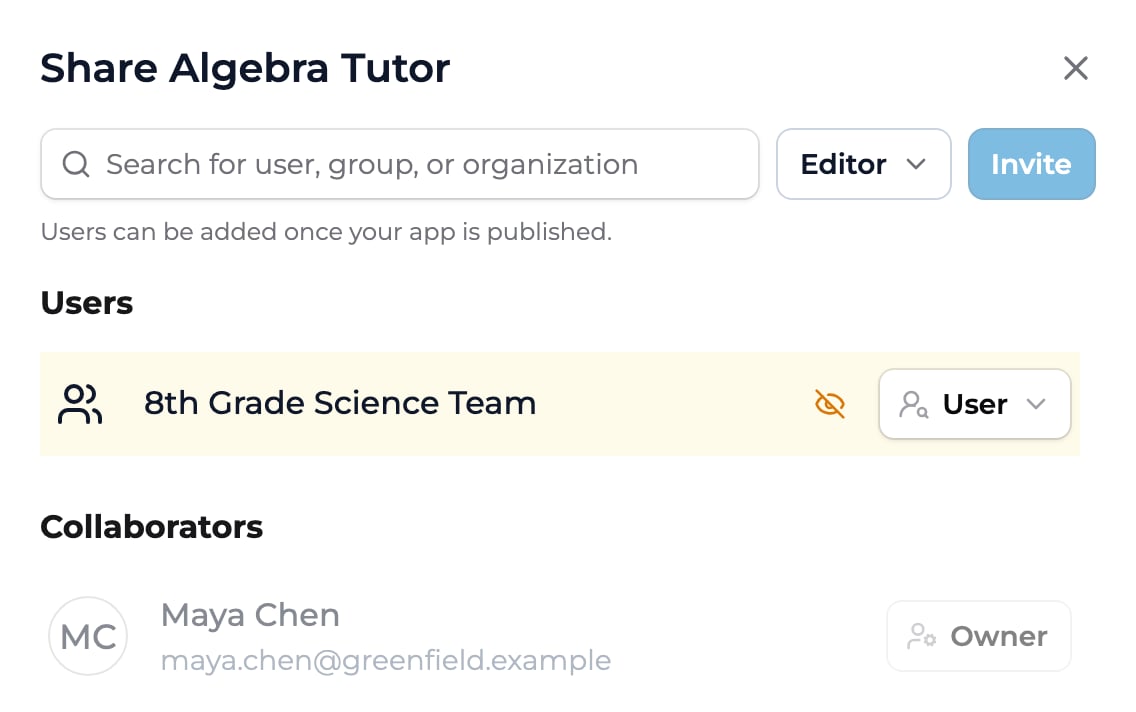
Set the role in the menu next to the search field: User lets members use what you shared; Editor is for collaborators who build with you.
Click Invite. Every member of the Group gets access at the role you set. In an app’s Share dialog, the Group is then listed under Users (User role) or Collaborators (Editor role).
The Share dialog with a Group added as a recipient. Set its role — here User — and every member of the Group gets that access.
Temporarily unavailable. Adding a Group directly to a space is paused while we improve how groups and spaces work together. In the meantime, place a whole team into a space by setting up the spaces and groups on an organization invitation — new members land in the right spaces on their first sign-in. Sharing apps and Collections with a Group (above) is unaffected.
When this returns, you’ll add a Group to a space from the space’s Add members dialog: switch to the Search organization tab, start typing the Group’s name, and pick it to bring in all its members at once — no need to add them one by one.
Membership changes flow through. Add someone to the Group later and they pick up everything already shared with it; remove them and their access drops. You don’t re-share.
What's the difference between a Group and a space?
A space is where apps live and where classroom activity happens. A Group is just a named list of people you can share to at once. A Group has no apps or activity of its own.
Can a member be in more than one Group?
Yes. People can belong to any number of Groups. Each Group’s shares apply independently.
Do I have to recreate a Group to change who's in it?
No. Open the Group and add or remove members. Anything already shared with the Group updates to match the new membership.
Can I share a Group with people outside my org?
Groups hold members of your own organization. To reach another organization, share with that org directly. See Sharing with groups and orgs.
{"docsConfig":{"theme":"mint","$schema":"https://mintlify.com/schema.json","name":"Playlab Learning Hub","colors":{"primary":"#3B82F6","light":"#60A5FA","dark":"#2563EB"},"logo":{"light":"https://mintcdn.com/playlabai/utDTSOWmKvEQ98EU/images/Playlab_Logo_Full_Black.svg?fit=max\u0026auto=format\u0026n=utDTSOWmKvEQ98EU\u0026q=85\u0026s=d97827114d3fcc02ee8b1933cd33990d","dark":"https://mintcdn.com/playlabai/utDTSOWmKvEQ98EU/images/Playlab_Logo_Full_Paper.svg?fit=max\u0026auto=format\u0026n=utDTSOWmKvEQ98EU\u0026q=85\u0026s=3fe8091c5012462c6a9679c1fcbd8953","href":"https://www.playlab.ai"},"favicon":{"light":"https://mintcdn.com/playlabai/utDTSOWmKvEQ98EU/images/Playlab_Logo_Black_Background_Small_Padding.png?fit=max\u0026auto=format\u0026n=utDTSOWmKvEQ98EU\u0026q=85\u0026s=7facc29acffbc6bdfa6953473a61026e","dark":"https://mintcdn.com/playlabai/utDTSOWmKvEQ98EU/images/Playlab_Logo_Paper_Black_Background.png?fit=max\u0026auto=format\u0026n=utDTSOWmKvEQ98EU\u0026q=85\u0026s=41576e87d0c66007c23406b6b1a84d1e"},"seo":{"metatags":{"og:image":"/images/og-card.png","twitter:image":"/images/og-card.png","twitter:card":"summary_large_image"}},"icons":{"library":"tabler"},"styling":{"latex":true},"navigation":{"pages":[]}},"deployment":{"deploymentMetadataValue":{"subdomain":"playlabai","hasAudioNarration":false,"actualSubdomain":"playlabai","customDomains":["learn.playlab.ai"],"gitSource":{"type":"github","owner":"playlab-education","repo":"docs","deployBranch":"main","contentDirectory":"","isPrivate":true,"mountPath":"","label":""},"entitlements":{"AI_CHAT":{"status":"ENABLED"},"WEB_MCP":{"status":"ENABLED"},"NARRATION":{"status":"ENABLED"}},"buildId":"6af3518d99e0270dac4b465b","clientVersion":"0.0.4102","searchFilterCounts":[{"language":"default","tag":"📋 Feature Documentation","count":54},{"language":"default","tag":"📚 Resources","count":23},{"language":"default","tag":"✏️ Learn on Your Own","count":19},{"language":"default","tag":"❓ FAQ","count":16},{"language":"default","tag":"⚙️ Changelog","count":8},{"language":"default","tag":"🔒 Privacy, Safety \u0026 Compliance","count":8},{"language":"default","tag":"🛠️ Build \u0026 Collaborate","count":8},{"language":"default","tag":"🟡 Basic Prompting","count":8},{"language":"default","tag":"🟣 Building Your App","count":7},{"language":"default","tag":"🟢 Voice, Language \u0026 Accessibility","count":7}]},"assistantConfig":{"deflection":{"enabled":true,"email":"support@playlab.ai"}},"basePath":"","hasChatPermissions":true,"hasWebMcpPermissions":true,"toggles":[{"name":"kill-isr","enabled":true,"variant":{"name":"disabled","enabled":false,"feature_enabled":true},"impressionData":false},{"name":"custom-rbac-roles","enabled":true,"variant":{"name":"disabled","enabled":false,"feature_enabled":true},"impressionData":false},{"name":"agent-mintlify-slack","enabled":true,"variant":{"name":"disabled","enabled":false,"feature_enabled":true},"impressionData":false},{"name":"agent-integrations-settings","enabled":true,"variant":{"name":"disabled","enabled":false,"feature_enabled":true},"impressionData":false},{"name":"rbac-expansion","enabled":true,"variant":{"name":"disabled","enabled":false,"feature_enabled":true},"impressionData":false},{"name":"automations-pr-grouping","enabled":true,"variant":{"name":"disabled","enabled":false,"feature_enabled":true},"impressionData":false},{"name":"custom-prefix","enabled":true,"variant":{"name":"disabled","enabled":false,"feature_enabled":true},"impressionData":false},{"name":"analytics-v7","enabled":true,"variant":{"name":"disabled","enabled":false,"feature_enabled":true},"impressionData":false},{"name":"user-flows-analytics","enabled":true,"variant":{"name":"disabled","enabled":false,"feature_enabled":true},"impressionData":false},{"name":"no-publish-flow","enabled":true,"variant":{"name":"disabled","enabled":false,"feature_enabled":true},"impressionData":false},{"name":"workos-onboarding","enabled":true,"variant":{"name":"disabled","enabled":false,"feature_enabled":true},"impressionData":false},{"name":"llms-txt-v2","enabled":true,"variant":{"name":"disabled","enabled":false,"feature_enabled":true},"impressionData":false},{"name":"snapshot-serving-live","enabled":true,"variant":{"name":"disabled","enabled":false,"feature_enabled":true},"impressionData":false},{"name":"stripTemperatureMiddleware","enabled":true,"variant":{"name":"disabled","enabled":false,"feature_enabled":true},"impressionData":false},{"name":"support-platform-pylon-zendesk","enabled":true,"variant":{"name":"disabled","enabled":false,"feature_enabled":true},"impressionData":false},{"name":"snapshot-serving","enabled":true,"variant":{"name":"disabled","enabled":false,"feature_enabled":true},"impressionData":false},{"name":"instant-rollback","enabled":true,"variant":{"name":"disabled","enabled":false,"feature_enabled":true},"impressionData":false},{"name":"granular-notifications-server","enabled":true,"variant":{"name":"disabled","enabled":false,"feature_enabled":true},"impressionData":false},{"name":"granular-notifications","enabled":true,"variant":{"name":"disabled","enabled":false,"feature_enabled":true},"impressionData":false},{"name":"automations-fable","enabled":true,"variant":{"name":"disabled","enabled":false,"feature_enabled":true},"impressionData":false},{"name":"fixed-ai-action-pricing","enabled":true,"variant":{"name":"disabled","enabled":false,"feature_enabled":true},"impressionData":false},{"name":"automation-resolve-merge-conflict","enabled":true,"variant":{"name":"disabled","enabled":false,"feature_enabled":true},"impressionData":false},{"name":"scoped-publishing","enabled":true,"variant":{"name":"disabled","enabled":false,"feature_enabled":true},"impressionData":false},{"name":"mintql","enabled":true,"variant":{"name":"disabled","enabled":false,"feature_enabled":true},"impressionData":false},{"name":"page-level-analytics","enabled":true,"variant":{"name":"disabled","enabled":false,"feature_enabled":true},"impressionData":false},{"name":"editor-version-history-v2","enabled":true,"variant":{"name":"disabled","enabled":false,"feature_enabled":true},"impressionData":false},{"name":"billing-page-v2","enabled":true,"variant":{"name":"disabled","enabled":false,"feature_enabled":true},"impressionData":false},{"name":"full-page-search","enabled":true,"variant":{"name":"disabled","enabled":false,"feature_enabled":true},"impressionData":false},{"name":"workspace-projects","enabled":true,"variant":{"name":"disabled","enabled":false,"feature_enabled":true},"impressionData":false},{"name":"assistant-v5","enabled":true,"variant":{"name":"disabled","enabled":false,"feature_enabled":true},"impressionData":false},{"name":"fork-pr-previews","enabled":true,"variant":{"name":"disabled","enabled":false,"feature_enabled":true},"impressionData":false},{"name":"revalidation-jwt","enabled":true,"variant":{"name":"disabled","enabled":false,"feature_enabled":true},"impressionData":false},{"name":"workos-sso-scim","enabled":true,"variant":{"name":"disabled","enabled":false,"feature_enabled":true},"impressionData":false},{"name":"hobby-abuse-scan","enabled":true,"variant":{"name":"disabled","enabled":false,"feature_enabled":true},"impressionData":false},{"name":"dashboard-inbox","enabled":true,"variant":{"name":"disabled","enabled":false,"feature_enabled":true},"impressionData":false},{"name":"workos-signup","enabled":true,"variant":{"name":"disabled","enabled":false,"feature_enabled":true},"impressionData":false},{"name":"turbopuffer-dual-write","enabled":true,"variant":{"name":"disabled","enabled":false,"feature_enabled":true},"impressionData":false},{"name":"workos-enabled","enabled":true,"variant":{"name":"disabled","enabled":false,"feature_enabled":true},"impressionData":false},{"name":"approve-review-flow","enabled":true,"variant":{"name":"disabled","enabled":false,"feature_enabled":true},"impressionData":false},{"name":"editor-metadata","enabled":true,"variant":{"name":"disabled","enabled":false,"feature_enabled":true},"impressionData":false},{"name":"sso-setup-deadline-banner","enabled":true,"variant":{"name":"disabled","enabled":false,"feature_enabled":true},"impressionData":false},{"name":"turbopuffer-serve","enabled":true,"variant":{"name":"disabled","enabled":false,"feature_enabled":true},"impressionData":false},{"name":"live-agents","enabled":true,"variant":{"name":"disabled","enabled":false,"feature_enabled":true},"impressionData":false}],"googleFontsInlined":false},"customCss":[{"filePath":"styles/v2-badges.css","content":".pl-badges{display:flex;flex-wrap:wrap;gap:6px;margin:0 0 1.25rem}.pl-badge{display:inline-flex;align-items:center;gap:4px;padding:3px 10px;border-radius:999px;font-family:\"Spline Sans Mono\", ui-monospace, \"SF Mono\", Menlo, monospace;font-size:11px;font-weight:500;line-height:1.5;letter-spacing:0.05em;text-transform:uppercase;white-space:nowrap}.pl-badge--neutral{background-color:#ffffff;color:#4F46E5;border:1px solid #4F46E5}.pl-badge--new{background-color:#4F46E5;color:#ffffff;border:1px solid #4F46E5}"},{"filePath":"styles/audience-tabs.css","content":".pl-audience-tabs [data-component-part=\"tabs-list\"]{display:grid;grid-template-columns:repeat(2, minmax(0, 1fr));gap:12px;border-bottom:0;padding-bottom:0;margin-bottom:2rem}.pl-audience-tabs [data-component-part=\"tab-button\"]{justify-content:center;gap:10px;max-width:none;width:100%;margin-bottom:0;padding:18px 20px;border:2px solid rgb(229 231 235);border-radius:14px;font-size:1.125rem;line-height:1.5rem;white-space:normal;text-align:center;transition:border-color 150ms, background-color 150ms}.pl-audience-tabs [data-component-part=\"tab-button\"]:hover{border-color:rgb(var(--primary) / 0.5)}.pl-audience-tabs [data-component-part=\"tab-button\"][data-active=\"true\"]{border-color:rgb(var(--primary));background-color:rgb(var(--primary) / 0.08)}.pl-audience-tabs .tab-icon{width:26px;height:26px}.dark .pl-audience-tabs [data-component-part=\"tab-button\"]{border-color:rgb(255 255 255 / 0.12)}.dark .pl-audience-tabs [data-component-part=\"tab-button\"]:hover{border-color:rgb(var(--primary-light) / 0.5)}.dark .pl-audience-tabs [data-component-part=\"tab-button\"][data-active=\"true\"]{border-color:rgb(var(--primary-light));background-color:rgb(var(--primary-light) / 0.1)}@media (max-width: 480px){.pl-audience-tabs [data-component-part=\"tabs-list\"]{grid-template-columns:1fr}}"}],"page":{"pagePath":"getstarted/Creating a Group","slug":"/getstarted/Creating a Group","pageMetadata":{"mode":"wide","title":"Creating a Group","description":"Bundle members into a Group so you can share apps and Collections with the whole set at once.","sidebarTitle":"Creating a Group","href":"/getstarted/Creating a Group"},"description":{"compiledSource":"\"use strict\";\nconst {jsx: _jsx} = arguments[0];\nconst {useMDXComponents: _provideComponents} = arguments[0];\nfunction _createMdxContent(props) {\n const _components = {\n p: \"p\",\n ..._provideComponents(),\n ...props.components\n };\n return _jsx(_components.p, {\n children: \"Bundle members into a Group so you can share apps and Collections with the whole set at once.\"\n });\n}\nfunction MDXContent(props = {}) {\n const {wrapper: MDXLayout} = {\n ..._provideComponents(),\n ...props.components\n };\n return MDXLayout ? _jsx(MDXLayout, {\n ...props,\n children: _jsx(_createMdxContent, {\n ...props\n })\n }) : _createMdxContent(props);\n}\nreturn {\n default: MDXContent\n};\n","frontmatter":{},"scope":{}},"pageType":"default","mdx":{"mdxSource":{"compiledSource":"\"use strict\";const{Fragment:_Fragment,jsx:_jsx,jsxs:_jsxs}=arguments[0];const{useMDXComponents:_provideComponents}=arguments[0];function _createMdxContent(props){const _components={a:`a`,hr:`hr`,li:`li`,ol:`ol`,p:`p`,strong:`strong`,ul:`ul`,..._provideComponents(),...props.components},{Accordion,AccordionGroup,Frame,Heading,Info,OptimizedImage,Step,Steps,Tip,Warning}=_components;if(!Accordion)_missingMdxReference(`Accordion`,true);if(!AccordionGroup)_missingMdxReference(`AccordionGroup`,true);if(!Frame)_missingMdxReference(`Frame`,true);if(!Heading)_missingMdxReference(`Heading`,true);if(!Info)_missingMdxReference(`Info`,true);if(!OptimizedImage)_missingMdxReference(`OptimizedImage`,true);if(!Step)_missingMdxReference(`Step`,true);if(!Steps)_missingMdxReference(`Steps`,true);if(!Tip)_missingMdxReference(`Tip`,true);if(!Warning)_missingMdxReference(`Warning`,true);return _jsxs(_Fragment,{children:[_jsx(Frame,{children:_jsx(`video`,{src:`https://mintcdn.com/playlabai/AGTUxnEnckKG14sG/videos/creategroup.mp4?fit=max\u0026auto=format\u0026n=AGTUxnEnckKG14sG\u0026q=85\u0026s=15a52285615389ea6f67fceb9c782d43`,autoPlay:true,loop:true,muted:true,playsInline:true,className:`mint-w-full mint-border mint-border-gray-300 mint-rounded-md mint-shadow-sm`,\"aria-label\":`On the organization's Groups page, Create Group is clicked, 8th Grade Science Team is typed as the Group Name, and Add Group is clicked. The new group's name is clicked to open Manage Group Members, where Maya Chen and Jordan Alvarez are found with Search for people and added to the Members list. The dialog is closed and the group shows 2 members.`,\"data-path\":`videos/creategroup.mp4`})}),`\n`,_jsxs(_components.p,{children:[`A `,_jsx(_components.strong,{children:`Group`}),` is a named set of members inside your organization that you can share with all at once. Instead of adding fifteen teachers to an app one at a time, you put them in a Group and share with the Group. Add or remove members later and their access follows automatically. Groups are an org-level container, so you create and manage them from your organization dashboard.`]}),`\n`,_jsxs(_components.p,{children:[`Groups are about `,_jsx(_components.strong,{children:`people`}),`; `,_jsx(_components.a,{href:`/getstarted/Creating%20a%20Collection`,children:`Collections`}),` are about `,_jsx(_components.strong,{children:`apps`}),`. They pair well: share a Collection with a Group to hand a curated set of apps to a whole team in one move.`]}),`\n`,_jsx(Heading,{level:`2`,id:`create-a-group`,children:`Create a Group`}),`\n`,_jsxs(Steps,{children:[_jsx(Step,{title:`Open Members`,icon:`layout-dashboard`,children:_jsxs(_components.p,{children:[`Groups live at the org level. Click `,_jsx(_components.strong,{children:`Members`}),` under `,_jsx(_components.strong,{children:`Admin`}),` in the sidebar.`]})}),_jsxs(Step,{title:`Go to the Groups tab`,icon:`users`,children:[_jsx(_components.p,{children:`You’ll see existing Groups in your org and a button to make a new one. An org with no Groups yet shows an empty state inviting you to create your first.`}),_jsx(Frame,{caption:`The Groups tab on the Members page. An org with no Groups yet shows this empty state.`,children:_jsx(OptimizedImage,{src:`https://mintcdn.com/playlabai/4lebQNPsNi1wa5mz/images/v2/creategroup1.png?fit=max\u0026auto=format\u0026n=4lebQNPsNi1wa5mz\u0026q=85\u0026s=75dbc6ae02ccaddb6445d09f6feffd4b`,alt:`An organization's Groups page, next to Members, showing the empty state 'Organize members with groups' with a Create Group button, and an Add Group button in the top right.`,width:`500`,className:`mint-mx-auto`,\"data-og-width\":`2240`,\"data-og-height\":`1520`,\"data-path\":`images/v2/creategroup1.png`,\"data-optimize\":`true`,\"data-opv\":`3`,srcset:`https://mintcdn.com/playlabai/4lebQNPsNi1wa5mz/images/v2/creategroup1.png?w=280\u0026fit=max\u0026auto=format\u0026n=4lebQNPsNi1wa5mz\u0026q=85\u0026s=a1810615fa36fe49a8b1548bf33d1bd0 280w, https://mintcdn.com/playlabai/4lebQNPsNi1wa5mz/images/v2/creategroup1.png?w=560\u0026fit=max\u0026auto=format\u0026n=4lebQNPsNi1wa5mz\u0026q=85\u0026s=63d902e486dd69a354a28b60019bf108 560w, https://mintcdn.com/playlabai/4lebQNPsNi1wa5mz/images/v2/creategroup1.png?w=840\u0026fit=max\u0026auto=format\u0026n=4lebQNPsNi1wa5mz\u0026q=85\u0026s=2de663f3478900a2312567dc3251ff1f 840w, https://mintcdn.com/playlabai/4lebQNPsNi1wa5mz/images/v2/creategroup1.png?w=1100\u0026fit=max\u0026auto=format\u0026n=4lebQNPsNi1wa5mz\u0026q=85\u0026s=b76a5297be290505c14da9a76f24a955 1100w, https://mintcdn.com/playlabai/4lebQNPsNi1wa5mz/images/v2/creategroup1.png?w=1650\u0026fit=max\u0026auto=format\u0026n=4lebQNPsNi1wa5mz\u0026q=85\u0026s=da3cc2f041a4d84cf42f186746f61b7b 1650w, https://mintcdn.com/playlabai/4lebQNPsNi1wa5mz/images/v2/creategroup1.png?w=2500\u0026fit=max\u0026auto=format\u0026n=4lebQNPsNi1wa5mz\u0026q=85\u0026s=035227e913c9384a91179c89976c3d21 2500w`})})]}),_jsx(Step,{title:`Click Create Group`,icon:`plus`,children:_jsxs(_components.p,{children:[`Click `,_jsx(_components.strong,{children:`Create Group`}),` in the empty state (or `,_jsx(_components.strong,{children:`Add Group`}),` in the top right), enter a `,_jsx(_components.strong,{children:`Group Name`}),`, and click `,_jsx(_components.strong,{children:`Add Group`}),`. Give your Group a clear name that says who’s in it — like “9th Grade Science Team,” “District Coaches,” or “Pilot Cohort.”`]})}),_jsxs(Step,{title:`Add members`,icon:`user-plus`,children:[_jsxs(_components.p,{children:[`Click the new Group’s name in the list to open the `,_jsx(_components.strong,{children:`Manage Group Members`}),` dialog. Add people two ways: `,_jsx(_components.strong,{children:`Search for people`}),` by name and pick them from the results, or `,_jsx(_components.strong,{children:`Paste a list`}),` of email addresses (comma-, whitespace-, or line-separated). Everyone you add must `,_jsx(_components.strong,{children:`already have a Playlab account and belong to your organization`}),` — Groups organize existing org members, they don’t invite new people. For a pasted list, click `,_jsx(_components.strong,{children:`Add members to group`}),`.`]}),_jsx(_components.p,{children:`Current members show in the list below, each with a remove icon. Managing a Group is just adding and removing people here, anytime.`}),_jsx(Frame,{caption:`The Manage Group Members dialog: search for people or paste a list of org emails, then click Add members to group. Current members appear below, each removable.`,children:_jsx(OptimizedImage,{src:`https://mintcdn.com/playlabai/Tbb7WWVdEpID-PNw/images/v2/managegroupmembers.png?fit=max\u0026auto=format\u0026n=Tbb7WWVdEpID-PNw\u0026q=85\u0026s=3074256569041feabc45d1a3a1e57919`,alt:`The Manage Group Members dialog with Search for people and Paste a list tabs, a search field, and the group's current members, each with a remove icon.`,width:`500`,className:`mint-mx-auto`,\"data-og-width\":`992`,\"data-og-height\":`1044`,\"data-path\":`images/v2/managegroupmembers.png`,\"data-optimize\":`true`,\"data-opv\":`3`,srcset:`https://mintcdn.com/playlabai/Tbb7WWVdEpID-PNw/images/v2/managegroupmembers.png?w=280\u0026fit=max\u0026auto=format\u0026n=Tbb7WWVdEpID-PNw\u0026q=85\u0026s=527dce7bc2bd286c334651ef7bc8ab3d 280w, https://mintcdn.com/playlabai/Tbb7WWVdEpID-PNw/images/v2/managegroupmembers.png?w=560\u0026fit=max\u0026auto=format\u0026n=Tbb7WWVdEpID-PNw\u0026q=85\u0026s=b470a886c29db9b35ede961f0c99fe10 560w, https://mintcdn.com/playlabai/Tbb7WWVdEpID-PNw/images/v2/managegroupmembers.png?w=840\u0026fit=max\u0026auto=format\u0026n=Tbb7WWVdEpID-PNw\u0026q=85\u0026s=2d8f6cc29b3234760f815aeafc35c6ac 840w, https://mintcdn.com/playlabai/Tbb7WWVdEpID-PNw/images/v2/managegroupmembers.png?w=1100\u0026fit=max\u0026auto=format\u0026n=Tbb7WWVdEpID-PNw\u0026q=85\u0026s=0b8607f429be1e155a8e8491613f006d 1100w, https://mintcdn.com/playlabai/Tbb7WWVdEpID-PNw/images/v2/managegroupmembers.png?w=1650\u0026fit=max\u0026auto=format\u0026n=Tbb7WWVdEpID-PNw\u0026q=85\u0026s=119ea35cdc0b4706e7bae82e8ed75991 1650w, https://mintcdn.com/playlabai/Tbb7WWVdEpID-PNw/images/v2/managegroupmembers.png?w=2500\u0026fit=max\u0026auto=format\u0026n=Tbb7WWVdEpID-PNw\u0026q=85\u0026s=6530f035376c07ebde8a10bfccd30d70 2500w`})})]}),_jsx(Step,{title:`Close when done`,icon:`check`,children:_jsxs(_components.p,{children:[`Members are added the moment you pick them in search or click `,_jsx(_components.strong,{children:`Add members to group`}),` — there’s no separate save. Close the dialog and the Group is ready to use as a recipient anywhere you share.`]})})]}),`\n`,_jsx(Heading,{level:`2`,id:`use-a-group`,children:`Use a Group`}),`\n`,_jsx(_components.p,{children:`Once a Group exists, it works as a single recipient anywhere you’d otherwise add people one at a time.`}),`\n`,_jsx(Heading,{level:`3`,id:`share-an-app-or-collection-with-the-group`,children:`Share an app or Collection with the Group`}),`\n`,_jsxs(_components.ol,{children:[`\n`,_jsxs(_components.li,{children:[`Open the app or `,_jsx(_components.a,{href:`/getstarted/Creating%20a%20Collection`,children:`Collection`}),` you want to share and click `,_jsx(_components.strong,{children:`Share`}),`.`]}),`\n`,_jsxs(_components.li,{children:[`In the `,_jsx(_components.strong,{children:`Search for user, group, or organization`}),` field, start typing the Group’s name and select it.`]}),`\n`,_jsxs(_components.li,{children:[`Set the role in the menu next to the search field: `,_jsx(_components.strong,{children:`User`}),` lets members use what you shared; `,_jsx(_components.strong,{children:`Editor`}),` is for collaborators who build with you.`]}),`\n`,_jsxs(_components.li,{children:[`Click `,_jsx(_components.strong,{children:`Invite`}),`. Every member of the Group gets access at the role you set. In an app’s Share dialog, the Group is then listed under `,_jsx(_components.strong,{children:`Users`}),` (User role) or `,_jsx(_components.strong,{children:`Collaborators`}),` (Editor role).`]}),`\n`]}),`\n`,_jsx(Frame,{caption:`The Share dialog with a Group added as a recipient. Set its role — here User — and every member of the Group gets that access.`,children:_jsx(OptimizedImage,{src:`https://mintcdn.com/playlabai/AGTUxnEnckKG14sG/images/v2/shareapptogroup.png?fit=max\u0026auto=format\u0026n=AGTUxnEnckKG14sG\u0026q=85\u0026s=b8d0f18abf808bd52040702bd36d3648`,alt:`The Share Algebra Tutor dialog with a search field, an Editor role menu, and an Invite button, a Users section listing the 8th Grade Science Team group as User, and a Collaborators section listing Maya Chen as Owner.`,width:`500`,className:`mint-mx-auto`,\"data-og-width\":`1136`,\"data-og-height\":`712`,\"data-path\":`images/v2/shareapptogroup.png`,\"data-optimize\":`true`,\"data-opv\":`3`,srcset:`https://mintcdn.com/playlabai/AGTUxnEnckKG14sG/images/v2/shareapptogroup.png?w=280\u0026fit=max\u0026auto=format\u0026n=AGTUxnEnckKG14sG\u0026q=85\u0026s=b438dff5808d3cd1dd7a4be370aab592 280w, https://mintcdn.com/playlabai/AGTUxnEnckKG14sG/images/v2/shareapptogroup.png?w=560\u0026fit=max\u0026auto=format\u0026n=AGTUxnEnckKG14sG\u0026q=85\u0026s=e917a4b2504619bf223ab2bdfb6fe93b 560w, https://mintcdn.com/playlabai/AGTUxnEnckKG14sG/images/v2/shareapptogroup.png?w=840\u0026fit=max\u0026auto=format\u0026n=AGTUxnEnckKG14sG\u0026q=85\u0026s=fe43abc994e41328eab6c856bcc06ecd 840w, https://mintcdn.com/playlabai/AGTUxnEnckKG14sG/images/v2/shareapptogroup.png?w=1100\u0026fit=max\u0026auto=format\u0026n=AGTUxnEnckKG14sG\u0026q=85\u0026s=58e4ee29797321693d71a301e0352702 1100w, https://mintcdn.com/playlabai/AGTUxnEnckKG14sG/images/v2/shareapptogroup.png?w=1650\u0026fit=max\u0026auto=format\u0026n=AGTUxnEnckKG14sG\u0026q=85\u0026s=0e41ff3db954f67be703d44d3be11016 1650w, https://mintcdn.com/playlabai/AGTUxnEnckKG14sG/images/v2/shareapptogroup.png?w=2500\u0026fit=max\u0026auto=format\u0026n=AGTUxnEnckKG14sG\u0026q=85\u0026s=ad489590b98bc19be5a741be2774436b 2500w`})}),`\n`,_jsx(Heading,{level:`3`,id:`add-a-whole-group-to-a-space`,children:`Add a whole Group to a space`}),`\n`,_jsx(Warning,{children:_jsxs(_components.p,{children:[_jsx(_components.strong,{children:`Temporarily unavailable.`}),` Adding a Group directly to a space is paused while we improve how groups and spaces work together. In the meantime, place a whole team into a space by setting up the `,_jsx(_components.strong,{children:`spaces and groups`}),` on an `,_jsx(_components.a,{href:`/getstarted/Adding%20Members%20to%20your%20Space`,children:`organization invitation`}),` — new members land in the right spaces on their first sign-in. Sharing apps and Collections with a Group (above) is unaffected.`]})}),`\n`,_jsxs(_components.p,{children:[`When this returns, you’ll add a Group to a space from the space’s `,_jsx(_components.strong,{children:`Add members`}),` dialog: switch to the `,_jsx(_components.strong,{children:`Search organization`}),` tab, start typing the Group’s name, and pick it to `,_jsx(_components.strong,{children:`bring in all its members at once`}),` — no need to add them one by one.`]}),`\n`,_jsx(Tip,{children:_jsx(_components.p,{children:`Membership changes flow through. Add someone to the Group later and they pick up everything already shared with it; remove them and their access drops. You don’t re-share.`})}),`\n`,_jsxs(_components.p,{children:[`For the full sharing walkthrough, including sharing with whole organizations, see `,_jsx(_components.a,{href:`/features/Sharing%20with%20Groups%20and%20Orgs`,children:`Sharing with groups and orgs`}),`.`]}),`\n`,_jsx(Heading,{level:`2`,id:`key-points`,children:`Key points`}),`\n`,_jsx(Info,{children:_jsxs(_components.ul,{children:[`\n`,_jsx(_components.li,{children:`A Group is a named, reusable set of members inside your organization`}),`\n`,_jsxs(_components.li,{children:[`Create it from the `,_jsx(_components.strong,{children:`Groups`}),` tab under `,_jsx(_components.strong,{children:`Admin → Members`}),`, then add members`]}),`\n`,_jsx(_components.li,{children:`Share an app or Collection with the Group and every member gets access`}),`\n`]})}),`\n`,_jsx(Heading,{level:`2`,id:`faq`,children:`FAQ`}),`\n`,_jsxs(AccordionGroup,{children:[_jsx(Accordion,{title:`What's the difference between a Group and a space?`,id:`whats-the-difference-between-a-group-and-a-space`,children:_jsx(_components.p,{children:`A space is where apps live and where classroom activity happens. A Group is just a named list of people you can share to at once. A Group has no apps or activity of its own.`})}),_jsx(Accordion,{title:`Can a member be in more than one Group?`,id:`can-a-member-be-in-more-than-one-group`,children:_jsx(_components.p,{children:`Yes. People can belong to any number of Groups. Each Group’s shares apply independently.`})}),_jsx(Accordion,{title:`Do I have to recreate a Group to change who's in it?`,id:`do-i-have-to-recreate-a-group-to-change-whos-in-it`,children:_jsx(_components.p,{children:`No. Open the Group and add or remove members. Anything already shared with the Group updates to match the new membership.`})}),_jsx(Accordion,{title:`Can I share a Group with people outside my org?`,id:`can-i-share-a-group-with-people-outside-my-org`,children:_jsxs(_components.p,{children:[`Groups hold members of your own organization. To reach another organization, share with that org directly. See `,_jsx(_components.a,{href:`/features/Sharing%20with%20Groups%20and%20Orgs`,children:`Sharing with groups and orgs`}),`.`]})})]}),`\n`,_jsx(_components.hr,{}),`\n`,_jsx(_components.p,{children:`Last updated: 09-28-2026`}),`\n`,_jsxs(_components.p,{children:[`Contact us at `,_jsx(_components.a,{href:`mailto:support@playlab.ai`,children:`support@playlab.ai`})]})]})}function MDXContent(props={}){const{wrapper:MDXLayout}={..._provideComponents(),...props.components};return MDXLayout?_jsx(MDXLayout,{...props,children:_jsx(_createMdxContent,{...props})}):_createMdxContent(props)}return{default:MDXContent};function _missingMdxReference(id,component){throw new Error(`Expected `+(component?`component`:`object`)+\" `\"+id+\"` to be defined: you likely forgot to import, pass, or provide it.\")}","frontmatter":{},"scope":{"config":{},"pageMetadata":{"mode":"wide","title":"Creating a Group","description":"Bundle members into a Group so you can share apps and Collections with the whole set at once.","sidebarTitle":"Creating a Group","href":"/getstarted/Creating a Group"}}},"mdxSourceWithNoJs":null},"mdxExtracts":{"tableOfContents":[{"title":"Create a Group","slug":"create-a-group","depth":2,"children":[]},{"title":"Use a Group","slug":"use-a-group","depth":2,"children":[{"title":"Share an app or Collection with the Group","slug":"share-an-app-or-collection-with-the-group","depth":3,"children":[]},{"title":"Add a whole Group to a space","slug":"add-a-whole-group-to-a-space","depth":3,"children":[]}]},{"title":"Key points","slug":"key-points","depth":2,"children":[]},{"title":"FAQ","slug":"faq","depth":2,"children":[]}],"codeExamples":{}},"jsLinks":[],"dynamicCss":".mint-mx-auto {\n margin-left: auto;\n margin-right: auto\n}\n.mint-w-full {\n width: 100%\n}\n.mint-rounded-md {\n border-radius: 0.375rem\n}\n.mint-border {\n border-width: 1px\n}\n.mint-border-gray-300 {\n --tw-border-opacity: 1;\n border-color: rgb(209 213 219 / var(--tw-border-opacity, 1))\n}\n.mint-shadow-sm {\n --tw-shadow: 0 1px 2px 0 rgb(0 0 0 / 0.05);\n --tw-shadow-colored: 0 1px 2px 0 var(--tw-shadow-color);\n box-shadow: var(--tw-ring-offset-shadow, 0 0 #0000), var(--tw-ring-shadow, 0 0 #0000), var(--tw-shadow)\n}","subdomain":"playlabai","siteName":"Playlab Learning Hub","title":"Creating a Group - Playlab Learning Hub","navMaps":{"firstHrefInVersion":{},"firstHrefInLanguage":{}},"lastModified":"2026-10-21T16:22:50.225Z","originalFileLocation":"getstarted/Creating a Group.mdx"},"headHtml":"\u003cscript data-mint-head>(function(){var d=document.documentElement,p=null;if(!p){try{p=localStorage.getItem(\"isDarkMode\")}catch(e){}if(p==='true')p='dark';else if(p==='false')p='light';if(p!=='light'\u0026\u0026p!=='dark'\u0026\u0026p!=='system')p=\"system\"}var r=p==='system'?(matchMedia(\"(prefers-color-scheme: dark)\").matches?'dark':'light'):p;d.classList.remove(r==='dark'?'light':'dark');d.classList.add(r);d.setAttribute(\"data-theme-preference\",p)})();\u003c/script>\u003cmeta data-mint-head name=\"description\" content=\"Bundle members into a Group so you can share apps and Collections with the whole set at once.\">\u003cmeta data-mint-head name=\"application-name\" content=\"Playlab Learning Hub\">\u003cmeta data-mint-head name=\"generator\" content=\"Mintlify\">\u003clink data-mint-head rel=\"icon\" type=\"image/png\" sizes=\"192x192\" href=\"/mintlify-assets/_mintlify/favicons/playlabai/OSQmfqyUom3Qa98V/_generated/favicon/android-chrome-192x192.png\" media=\"(prefers-color-scheme: light)\">\u003clink data-mint-head rel=\"apple-touch-icon\" type=\"image/png\" sizes=\"180x180\" href=\"/mintlify-assets/_mintlify/favicons/playlabai/OSQmfqyUom3Qa98V/_generated/favicon/apple-touch-icon.png\">\u003clink data-mint-head rel=\"icon\" type=\"image/png\" sizes=\"16x16\" href=\"/mintlify-assets/_mintlify/favicons/playlabai/OSQmfqyUom3Qa98V/_generated/favicon/favicon-16x16.png\" media=\"(prefers-color-scheme: light)\">\u003clink data-mint-head rel=\"icon\" type=\"image/png\" sizes=\"32x32\" href=\"/mintlify-assets/_mintlify/favicons/playlabai/OSQmfqyUom3Qa98V/_generated/favicon/favicon-32x32.png\" media=\"(prefers-color-scheme: light)\">\u003clink data-mint-head rel=\"shortcut icon\" type=\"image/x-icon\" href=\"/mintlify-assets/_mintlify/favicons/playlabai/OSQmfqyUom3Qa98V/_generated/favicon/favicon.ico\" media=\"(prefers-color-scheme: light)\">\u003clink data-mint-head rel=\"icon\" type=\"image/png\" sizes=\"192x192\" href=\"/mintlify-assets/_mintlify/favicons/playlabai/OSQmfqyUom3Qa98V/_generated/favicon-dark/android-chrome-192x192.png\" media=\"(prefers-color-scheme: dark)\">\u003clink data-mint-head rel=\"icon\" type=\"image/png\" sizes=\"16x16\" href=\"/mintlify-assets/_mintlify/favicons/playlabai/OSQmfqyUom3Qa98V/_generated/favicon-dark/favicon-16x16.png\" media=\"(prefers-color-scheme: dark)\">\u003clink data-mint-head rel=\"icon\" type=\"image/png\" sizes=\"32x32\" href=\"/mintlify-assets/_mintlify/favicons/playlabai/OSQmfqyUom3Qa98V/_generated/favicon-dark/favicon-32x32.png\" media=\"(prefers-color-scheme: dark)\">\u003clink data-mint-head rel=\"shortcut icon\" type=\"image/x-icon\" href=\"/mintlify-assets/_mintlify/favicons/playlabai/OSQmfqyUom3Qa98V/_generated/favicon-dark/favicon.ico\" media=\"(prefers-color-scheme: dark)\">\u003cmeta data-mint-head property=\"og:title\" content=\"Creating a Group - Playlab Learning Hub\">\u003cmeta data-mint-head property=\"og:description\" content=\"Bundle members into a Group so you can share apps and Collections with the whole set at once.\">\u003cmeta data-mint-head property=\"og:site_name\" content=\"Playlab Learning Hub\">\u003cmeta data-mint-head property=\"og:url\" content=\"https://learn.playlab.ai/getstarted/Creating a Group\">\u003cmeta data-mint-head property=\"og:type\" content=\"website\">\u003cmeta data-mint-head property=\"og:image\" content=\"https://playlabai.mintlify.site/images/og-card.png\">\u003cmeta data-mint-head property=\"og:image:width\" content=\"1200\">\u003cmeta data-mint-head property=\"og:image:height\" content=\"630\">\u003cmeta data-mint-head name=\"twitter:card\" content=\"summary_large_image\">\u003cmeta data-mint-head name=\"twitter:title\" content=\"Creating a Group - Playlab Learning Hub\">\u003cmeta data-mint-head name=\"twitter:description\" content=\"Bundle members into a Group so you can share apps and Collections with the whole set at once.\">\u003cmeta data-mint-head name=\"twitter:image\" content=\"https://playlabai.mintlify.site/images/og-card.png\">\u003cmeta data-mint-head name=\"twitter:image:width\" content=\"1200\">\u003cmeta data-mint-head name=\"twitter:image:height\" content=\"630\">\u003cmeta data-mint-head name=\"msapplication-config\" content=\"/mintlify-assets/_mintlify/favicons/playlabai/OSQmfqyUom3Qa98V/_generated/favicon/browserconfig.xml\">\u003cmeta data-mint-head name=\"apple-mobile-web-app-title\" content=\"Playlab Learning Hub\">\u003cmeta data-mint-head name=\"msapplication-TileColor\" content=\"#3B82F6\">\u003clink data-mint-head rel=\"canonical\" href=\"https://learn.playlab.ai/getstarted/Creating a Group\">\u003clink data-mint-head rel=\"alternate\" type=\"application/xml\" href=\"/sitemap.xml\">\u003clink data-mint-head rel=\"alternate\" type=\"text/markdown\" href=\"/getstarted/Creating%20a%20Group.md\">\u003cscript data-mint-head type=\"application/ld+json\">{\"@context\":\"https://schema.org\",\"@graph\":[{\"@type\":\"Organization\",\"@id\":\"https://learn.playlab.ai/#organization\",\"name\":\"Playlab Learning Hub\",\"url\":\"https://learn.playlab.ai\",\"logo\":{\"@type\":\"ImageObject\",\"url\":\"https://mintcdn.com/playlabai/utDTSOWmKvEQ98EU/images/Playlab_Logo_Full_Black.svg?fit=max\u0026auto=format\u0026n=utDTSOWmKvEQ98EU\u0026q=85\u0026s=d97827114d3fcc02ee8b1933cd33990d\"}},{\"@type\":\"WebSite\",\"@id\":\"https://learn.playlab.ai#website\",\"name\":\"Playlab Learning Hub\",\"url\":\"https://learn.playlab.ai\",\"publisher\":{\"@id\":\"https://learn.playlab.ai/#organization\"}},{\"@type\":\"WebPage\",\"@id\":\"https://learn.playlab.ai/getstarted/Creating%20a%20Group#webpage\",\"url\":\"https://learn.playlab.ai/getstarted/Creating%20a%20Group\",\"name\":\"Creating a Group\",\"description\":\"Bundle members into a Group so you can share apps and Collections with the whole set at once.\",\"dateModified\":\"2026-10-21T16:22:50.225Z\",\"isPartOf\":{\"@id\":\"https://learn.playlab.ai#website\"},\"breadcrumb\":{\"@id\":\"https://learn.playlab.ai/getstarted/Creating%20a%20Group#breadcrumb\"}},{\"@type\":\"BreadcrumbList\",\"@id\":\"https://learn.playlab.ai/getstarted/Creating%20a%20Group#breadcrumb\",\"itemListElement\":[{\"@type\":\"ListItem\",\"position\":1,\"name\":\"👥 Organizing \u0026 Members\",\"item\":\"https://learn.playlab.ai/getstarted/Creating%20Your%20Own%20Space\"},{\"@type\":\"ListItem\",\"position\":2,\"name\":\"Creating a Group\",\"item\":\"https://learn.playlab.ai/getstarted/Creating%20a%20Group\"}]},{\"@type\":[\"Article\",\"TechArticle\"],\"@id\":\"https://learn.playlab.ai/getstarted/Creating%20a%20Group#article\",\"headline\":\"Creating a Group\",\"name\":\"Creating a Group\",\"description\":\"Bundle members into a Group so you can share apps and Collections with the whole set at once.\",\"url\":\"https://learn.playlab.ai/getstarted/Creating%20a%20Group\",\"mainEntityOfPage\":{\"@id\":\"https://learn.playlab.ai/getstarted/Creating%20a%20Group#webpage\"},\"image\":\"https://learn.playlab.ai/images/og-card.png\",\"dateModified\":\"2026-10-21T16:22:50.225Z\",\"publisher\":{\"@id\":\"https://learn.playlab.ai/#organization\"},\"isPartOf\":{\"@id\":\"https://learn.playlab.ai#website\"}}]}\u003c/script>\u003cscript data-mint-head type=\"application/ld+json\">{\"@context\":\"https://schema.org\",\"@type\":\"WebSite\",\"name\":\"Playlab Learning Hub\",\"publisher\":{\"@type\":\"Organization\",\"name\":\"Playlab Learning Hub\"},\"provider\":{\"@type\":\"Organization\",\"name\":\"Mintlify\",\"url\":\"https://mintlify.com\"}}\u003c/script>","agentPointerHref":"/getstarted/Creating%20a%20Group.md","siteName":"Playlab Learning Hub","nav":{"global":null,"tabs":[{"tab":"🎓 Learn Live with Us","pages":[{"title":"🎓 Learn Live with Us","href":"/introduction"}]},{"tab":"✏️ Learn on Your Own","groups":[{"group":"Overview","pages":[{"mode":"wide","title":"Learn on Your Own","sidebarTitle":"Overview","href":"/getstarted/Overview"}]},{"group":"▶️ Getting Started","pages":[{"mode":"wide","title":"Signing up for Playlab","sidebarTitle":"Signing Up","href":"/getstarted/Signing Up"},{"mode":"wide","title":"Getting started","sidebarTitle":"Getting Started","href":"/getstarted/Getting Started"},{"mode":"wide","title":"Navigating Playlab","sidebarTitle":"Navigating Playlab","href":"/getstarted/Navigating Playlab"}]},{"group":"🛠️ Build \u0026 Collaborate","pages":[{"mode":"wide","title":"Creating your first Playlab app","sidebarTitle":"Creating an App","href":"/getstarted/Creating a Playlab App"},{"mode":"wide","title":"Collaborating on an app","sidebarTitle":"Collaborating on an App","href":"/getstarted/Collaborating on an App"},{"mode":"wide","title":"Changing Name and Description","sidebarTitle":"Changing Name and Description","href":"/getstarted/Changing Name and Description"},{"mode":"wide","title":"Adding References","sidebarTitle":"Adding References","href":"/getstarted/Adding References"},{"mode":"wide","title":"Using the design tab","sidebarTitle":"Using the Design Tab","href":"/getstarted/Using the Design Tab"},{"mode":"wide","title":"Adding starter inputs","sidebarTitle":"Starter Inputs","href":"/getstarted/Adding Starter Inputs"},{"mode":"wide","title":"Co-Builder","sidebarTitle":"Co-Builder","href":"/getstarted/Co-Builder"},{"mode":"wide","title":"Image Inputs in Playlab","sidebarTitle":"Image Inputs in Playlab","href":"/getstarted/Image Input"},{"mode":"wide","title":"App privacy and visibility","sidebarTitle":"App Privacy","tag":"New","href":"/features/App Privacy and Visibility"},{"mode":"wide","title":"Sharing with individuals","sidebarTitle":"Share with Individuals","tag":"New","href":"/features/Sharing with Individuals"},{"mode":"wide","title":"Sharing with groups and orgs","sidebarTitle":"Share with Groups and Orgs","tag":"New","href":"/features/Sharing with Groups and Orgs"},{"mode":"wide","title":"Using an app across multiple classes","sidebarTitle":"Share Apps to a Space","tag":"New","href":"/features/Cross-Space App Use"},{"mode":"wide","title":"Publishing your app","sidebarTitle":"Publishing","href":"/features/Publishing"},{"mode":"wide","title":"Share with Collections","sidebarTitle":"Share with Collections","tag":"New","href":"/features/collections/What are Collections"},{"mode":"wide","title":"Deleting Your Playlab App","sidebarTitle":"Deleting Your Playlab App","href":"/getstarted/Deleting"}]},{"group":"👥 Organizing \u0026 Members","pages":[{"mode":"wide","title":"Creating and managing a space","sidebarTitle":"Creating a Space","href":"/getstarted/Creating Your Own Space"},{"mode":"wide","title":"Adding members and inviting users","description":"Add colleagues and educators to your organization or a space, or get students into a class space by invite link, code, or email.","sidebarTitle":"Adding Members","href":"/getstarted/Adding Members to your Space"},{"mode":"wide","title":"Creating a Group","sidebarTitle":"Creating a Group","href":"/getstarted/Creating a Group"},{"mode":"wide","title":"Space building permissions","description":"Four toggles that control whether members can build apps, see each other's apps, share beyond the space, and manage their own apps.","sidebarTitle":"Building Permissions","href":"/getstarted/Space Building Permissions"},{"mode":"wide","title":"Creating a Collection","sidebarTitle":"Creating a Collection","href":"/getstarted/Creating a Collection"},{"mode":"wide","title":"Sharing a Collection","sidebarTitle":"Sharing a Collection","href":"/getstarted/Sharing a Collection"}]},{"group":"📊 Session Activity","pages":[{"mode":"wide","title":"Reviewing Session Activity","sidebarTitle":"Reviewing Session Activity","href":"/getstarted/Reviewing Activity"},{"mode":"wide","title":"Exporting activity data","sidebarTitle":"Exporting Activity Data","href":"/getstarted/Exporting Activity Data"}]}]},{"tab":"📋 Feature Documentation","pages":[{"title":"📋 Feature Documentation","href":"/features/Overview"}]},{"tab":"⚙️ Changelog","pages":[{"title":"⚙️ Changelog","href":"/changelog/Playlab Q4 2026 Update"}]},{"tab":"📚 Resources","pages":[{"title":"📚 Resources","href":"/resources/aipolicies"}]},{"tab":"❓ FAQ","pages":[{"title":"❓ FAQ","href":"/faq/FAQ"}]}]},"basePath":"","title":"Creating a Group - Playlab Learning Hub","buildId":"dpl_596ePT575z4qnAFksq1biRW97aLY","deploymentId":"dpl_596ePT575z4qnAFksq1biRW97aLY","dynamics":["07c022d89b","a74be98ba7"],"chunks":["Frame-BXrZabKK.js","DynamicMarkdown-CtasenyM.js","zoom-image-lightbox-C5F0mVLH.js","lightbox-handle-r17bVUz3.js"]}